top of page

Sending invoices & price quotes

Wix Invoices & Price Quotes: Adding Your Items and Services

Wix Invoices and Price Quotes lets you bill customers for items or services you provide. You can add them in advance so that they’re available whenever you create an invoice or price quote, or add them while you’re creating the invoice or price quote.

Are you using Wix Stores?

These instructions are meant for items that you prefer to send separately, and don't already appear in your catalog. You can also create automated invoices for each store order you receive.

To add an item or service:

  1. Go to Invoices or Price Quotes in your site's dashboard.

  2. Click More Actions at the top right.

  3. Select Create items & services.

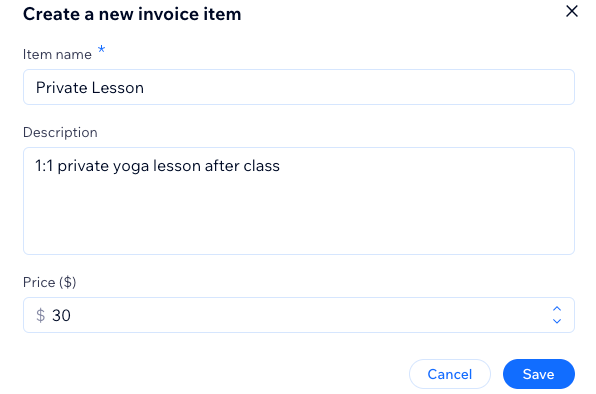
  4. Click + New Item and enter the details:Item / Service: Enter the name of the item or service.
    Description: Add a short description.
    Price: Enter the price of the item or service.

  5. Click Save.

A screenshot showing how to create an item or service to add to your future invoices.

Tip:

You can also add a new item or service while creating an invoice or price quote. Start typing in the Item or Service field and click New Item.

Want to edit or delete an item or service?

Click the Edit icon  or the Delete icon next to the item / service you want to make changes to.
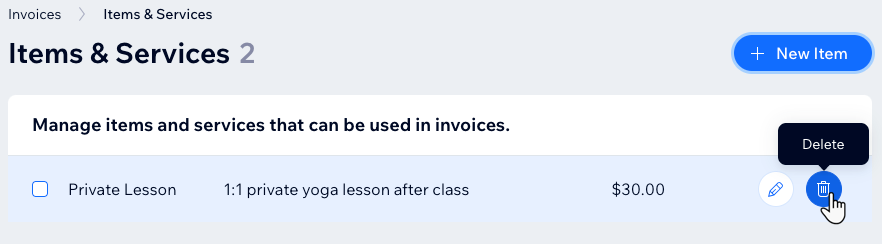
A screenshot showing how to delete an item or a service in the invoices section of the dashboard.

Need A Professional Website?
Contact Us 
Today!

Google Workspace Error Message: "Your subscription has been suspended by your reseller"

Google Workspace Error Message: Service Is Temporarily Suspended until Your Customer Accepts the New Terms of Service

Google Workspace Error Message: "You already have a Google Workspace business email account. You can manage it from the Google Admin Console"

Google Workspace: Data Migration from an External Email to Your Google Workspace

Google Workspace: Revoking Admin Status to Delete a Workspace Account

Google Workspace: Connecting Your Business Email to a Mail Client Using IMAP and SMTP

Google Workspace: Changing the Language of Your Business Email

Google Workspace: Emails Missing from Your Business Email

Google Workspace: Allowing Access for ‘Less Secure Apps’ in Your Business Email

Google Workspace: Adding Google Workspace MX Records to Your Wix Account

Google Workspace: Setting Up a Domain Alias

Google Workspace: Manually Verifying Your Domain with Google

Google Workspace: Connecting a Business Email for a Domain Pointing to Wix

Google Workspace: Setting Up an Email Alias for an Existing Workspace User Email Address

Google Workspace: Resetting a Workspace User's Password

Google Workspace: Renaming a Workspace User

Google Workspace: Accessing Your Additional Workspace Users

Google Workspace: Purchasing Additional Business Emails from Wix

Google Workspace: Setting Up Business Email Users

Gemini for Google Workspace: An Overview

Google Workspace: Upgrading a Workspace Plan

Google Workspace: Choosing a Plan

Google Workspace: Business Email Sending Limits

Google Workspace: Forwarding Emails From Your Business Email to Another Email Address

Google Workspace: Resetting Your Admin Password

Google Workspace: Accessing Your Admin Console

Google Workspace: Identifying Your Admin Workspace User

Google Workspace: Setting Up Your Business Email on Mobile Devices

Google Workspace: Username and Password Guidelines

Google Workspace: Accessing your Business Email Through Your Wix Account

wix experts
Graphic2Traffic web design
©
bottom of page