top of page

Wix Forms FAQ

Wix Forms: Managing Your Forms from the Dashboard

The Forms dashboard shows a list of all the forms you've created. From this dashboard, you can edit your forms, see how a form appears to visitors, and review the submissions table with all the data from those who submitted.

Screenshot of forms dashboard with more actions button selected, highlighting the display of different management options

Note:

This article refers to managing site forms. Learn more about managing standalone forms.

To manage your forms from the dashboard:

New Forms

Old Forms

  1. Go to Forms in your site's dashboard.

  2. Manage your forms using the available options:

Preview a form

See how the form appears on your live site.

  1. Click the More Actions icon  next to the relevant form.

  2. Click Preview.

Create a new form

  1. Click + Create Form at the top right.

  2. Create and customize your form in the form builder.

  3. Click Save.

  4. Click Back to Forms at the top left.

  5. (Optional) Add the form you just created to your site:Click the More Actions icon  next to the relevant form.
    Click Add to site.
    Click Go to Editor.
    Click Add Existing Form.
    Select the form you just created.

screenshot of the add elements panel in wix editor with add existing form highlighted

Edit a form

  1. Hover over the relevant form.

  2. Click Edit Form.
    Note: You will be redirected to the form builder.

  3. Create and customize your form.

  4. Click Save.

Delete a form

  1. Click the More Actions icon  next to the relevant form.

  2. Click Delete.

  3. Click Delete in the pop-up to confirm.

screenshot of delete forms and submissions pop up displaying information on form deletion, option to cancel or delete

View form submissions

  1. Click the More Actions icon  next to the relevant form.

  2. Click View submissions.
    Note: You can also access the submissions table by clicking the number of submissions next to the relevant form.  Learn more about viewing and managing form submissions.
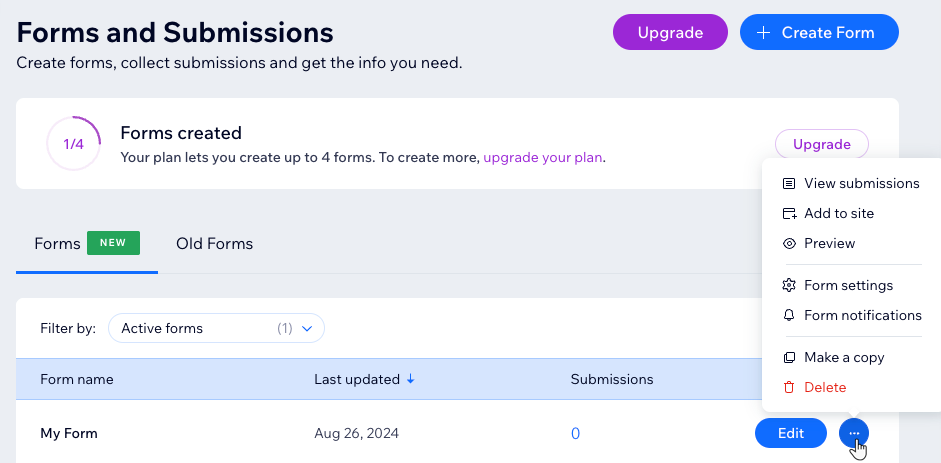
The Forms and Submissions dashboard for the new Wix Forms, showing the form management options

Tip:

See how many forms you can create at the top of the Forms and Submissions dashboard. To add more forms to your plan click Upgrade.

Need A Professional Website?
Contact Us 
Today!

Setting Up Tax Groups Using Automatic Tax Calculation

Setting Up Automatic Tax Calculation

About Automatic Tax Collection

Setting Up Tax Groups Using Manual Tax Calculation

Setting Up Tax Calculation Using the Manual Method

Tax Collection: An Overview

Connecting Flow as a Payment Provider

Connecting Tranzzo as a Payment Provider

Syncing SKU IQ with Square and Wix

Connecting iCredit as a Payment Provider

Connecting Cal powered by PayMe as a Payment Provider

Connecting Pagopar as a Payment Provider

Connecting POLi as a Payment Provider

Connecting PaidBy Bank as a Payment Provider

Connecting PostFinance as a Payment Provider

Connecting Nimbbl as a Payment Provider

Connecting airpay as a Payment Provider

Connecting Easebuzz as a Payment Provider

Connecting MakeCommerce as a Payment Provider

Connecting KG Inicis as a Payment Provider

Connecting seQura as a Payment Provider

About 3D Secure (3DS) Payments with Third-Party Payment Providers

Connecting Ziina as a Payment Provider

Connecting Faster Payment System as a payment method (through Oceanpayment)

Connecting easypay as a Payment Provider

Connecting Exactly as a Payment Provider

Connecting PayItMonthly as a Payment Provider

Troubleshooting Pending PayPal Payments

Connecting Tranzila as a Payment Provider for Card, Google Pay and bit Payments

Connecting Moneris as a Payment Provider

wix experts
Graphic2Traffic web design
©
bottom of page