top of page

Designing Wix Events

Wix Events: Displaying a Standalone Wix Events Button

If you write about an event somewhere on your site other than the Wix Events page, you can add a standalone event button. This makes it easy for interested site visitors to book.

Note:

The standalone event button is currently not available in Editor X.

To add an event button:

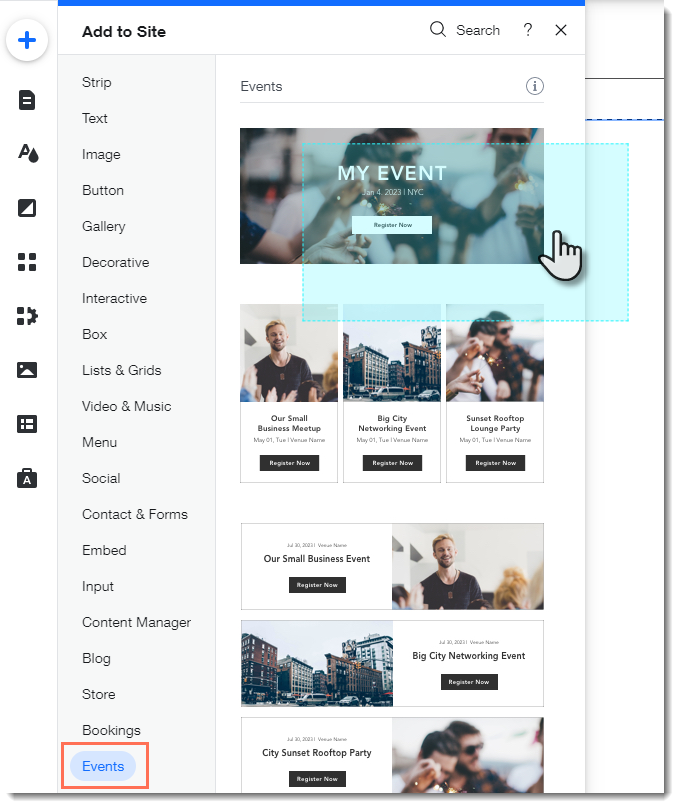
  1. Click Addon the left side of the Editor.

  2. Select Events.

  3. Drag the single event display to the page.
  1. Click the Wix Events app in the Editor.

  2. Click Display Events.

  3. Under What do you want to show?, select A Single Event.

  4. Select the relevant event.

  5. Click the Layout tab.

  6. Select Button.

  7. (Optional) Edit the button:Click the Text tab to edit the button text or add a label.
    Click the Design tab to edit the look of the button.

Need A Professional Website?
Contact Us 
Today!

Wix Bookings: Adding and Setting Up the Next Availability Widget

Wix Bookings: Scheduling and Managing Multi-Service Appointments

Service List Title / Image Navigates to Calendar Page Instead of Service Page

Wix Bookings: Adding and Setting Up a Single Service Calendar

Wix Bookings: Customizing Your Weekly Timetable

Wix Bookings: Adding and Setting Up a Weekly Timetable

Wix Bookings: Customizing Your Staff Members Widget

Wix Bookings: Customizing Booking Form Fields

Wix Bookings: Customizing Your Booking Calendar Page

Wix Bookings: Adding and Setting up a Staff Members Widget on Your Site

Wix Bookings: Adding and Setting Up a Daily Agenda on Your Site

Wix Bookings: Adding and Setting Up a Standalone Book Button

Wix Bookings: Customizing Your Service Pages

Wix Bookings: About the "My Bookings" Page

Wix Bookings: Displaying Different Services on Different Pages

Wix Bookings: Displaying a Featured Service on Your Site

Wix Bookings: Hiding Images from the Service List

Wix Bookings: Changing the Contact and Location Info on the Service Page

Wix Bookings: Customizing Your Thank You Page

Wix Bookings: Setting Up Your Service List

Wix Bookings: About Bookings Pages

Wix Bookings: Saving and Charging Clients' Credit Cards

Wix Bookings: Sending Payment Requests to Clients Using Automations

Wix Bookings: Understanding Price Options

Wix Bookings: Making Credit Card Payments for Your Clients

Wix Bookings: Setting Up Tax

Wix Bookings: Sending an Invoice

Wix Bookings: Extending the Duration of a Membership Plan or Package

Memberships, packages & payments

Wix Bookings: Getting Paid Offline or in Person

wix experts
Graphic2Traffic web design
©
bottom of page