top of page

Creating your event

Wix Events: Creating a Hybrid Event

Important:

As of March 2024, the option to connect to Wix Live is no longer available. If you’ve already created events with Wix Live, you can continue using it in the meantime.

Hybrid events are events in which some guests attend in person while others join online.

Any event you create in Wix Events can become a hybrid event. While creating the event, simply create a regular in-person event and add video conferencing.

A screenshot of a hybrid event promotion.

Step 1 | Create an event with your physical location

Creating an event draft (or edit an existing draft) and make sure to add the physical location where the event will take place.

To create an event draft with your physical location:

  1. Create an event and save it as a draft or published event. Learn how to create an event.

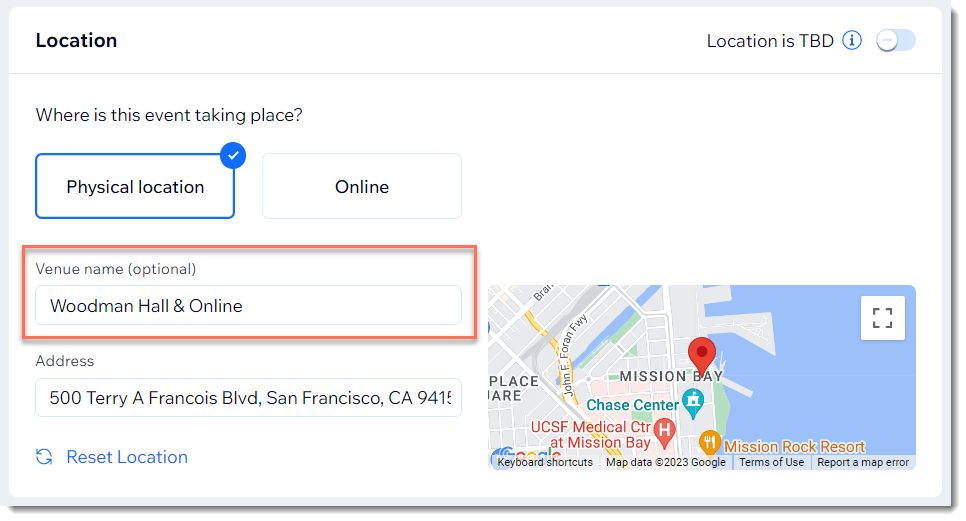
  2. Under Location, select Physical location.

  3. Enter the physical address where the event takes place.

  4. In the Venue name field, enter a message that lets guests know they can join online.

  5. Click Create Event.

A screenshot of the Location panel when setting up an event.

Step 2 | Add video conferencing

After creating your event, you can add and set up video conferencing in addition to the physical location.

To add video conferencing:

  1. Go to the Events in your site's dashboard.

  2. Select the relevant event.

  3. Click Features.

  4. Click Video Conferencing.

  5. Click Setup video Conferencing.

  6. Select and set up a video conferencing option:Add video conferencing with Wix Live Video
    Add video conferencing with Zoom.
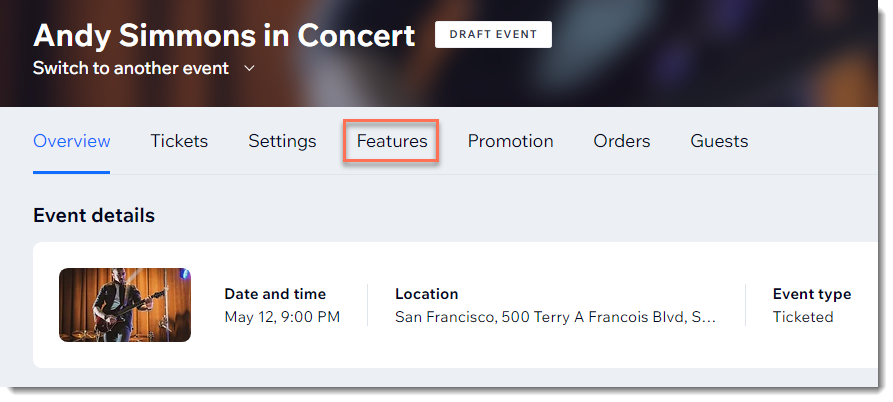
A screenshot of the Features tab for an event in a site's dashboard.

Need A Professional Website?
Contact Us 
Today!

Connecting Authorize.net Powered by Bankful as a Payment Provider

Connecting Klarna as a Payment Provider

Connecting SeerBit as a Payment Provider

Connecting Webpay Plus-Transbank as a Payment Provider

Connecting Atome as a Payment Provider

Connecting Affirm as a Payment Provider

Connecting Pay TR as a Payment Provider

Connecting Sezzle as a Payment Provider

Connecting CXPay as a Payment Provider

Connecting Afterpay as a Payment Provider

Connecting Rapyd Payments as a Payment Provider

Connecting Clearpay as a Payment Provider

Connecting Yoco as a Payment Provider

Connecting Titre Restaurants Conecs as a Payment Method (Through Lyra)

Connecting Multibanco as a Payment Method (Through Lyra Collect)

Connecting Fondy as a Payment Provider

Connecting Xendit as a Payment Provider

Connecting Razorpay as a Payment Provider

Connecting Laybuy as a Payment Provider

Connecting Lyra Collect as a Payment Provider

Connecting UAPay as a Payment Provider

Connecting Paysafecash as a Payment Method (through Skrill)

Connecting Rapid Transfer as a Payment Method (through Skrill)

Connecting Przelewy24 as a Payment Method (through Skrill)

Connecting Skrill Digital Wallet as a Payment Method

Connecting Skrill as a Payment Provider for Credit/Debit Card Transactions

Connecting Mobile Payment as a Payment Method (Through KOMOJU)

Connecting Pay-Easy as a Payment Method (Through KOMOJU)

Connecting WeChat Pay as a Payment Method (Through Oceanpayment)

Connecting AliPay as a Payment Method (Through Oceanpayment)

wix experts
Graphic2Traffic web design
©
bottom of page