top of page

Creating your event

Wix Events: Creating a Hybrid Event

Important:

As of March 2024, the option to connect to Wix Live is no longer available. If you’ve already created events with Wix Live, you can continue using it in the meantime.

Hybrid events are events in which some guests attend in person while others join online.

Any event you create in Wix Events can become a hybrid event. While creating the event, simply create a regular in-person event and add video conferencing.

A screenshot of a hybrid event promotion.

Step 1 | Create an event with your physical location

Creating an event draft (or edit an existing draft) and make sure to add the physical location where the event will take place.

To create an event draft with your physical location:

  1. Create an event and save it as a draft or published event. Learn how to create an event.

  2. Under Location, select Physical location.

  3. Enter the physical address where the event takes place.

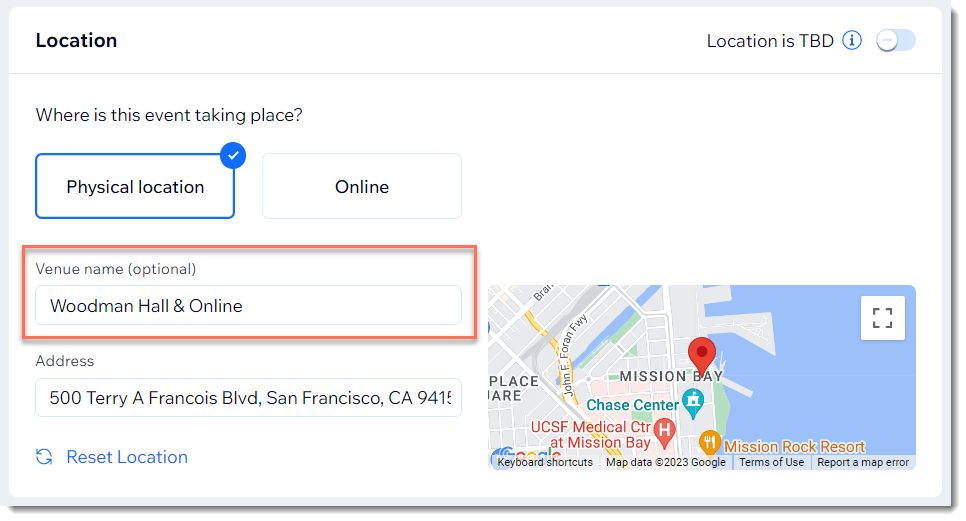
  4. In the Venue name field, enter a message that lets guests know they can join online.

  5. Click Create Event.

A screenshot of the Location panel when setting up an event.

Step 2 | Add video conferencing

After creating your event, you can add and set up video conferencing in addition to the physical location.

To add video conferencing:

  1. Go to the Events in your site's dashboard.

  2. Select the relevant event.

  3. Click Features.

  4. Click Video Conferencing.

  5. Click Setup video Conferencing.

  6. Select and set up a video conferencing option:Add video conferencing with Wix Live Video
    Add video conferencing with Zoom.
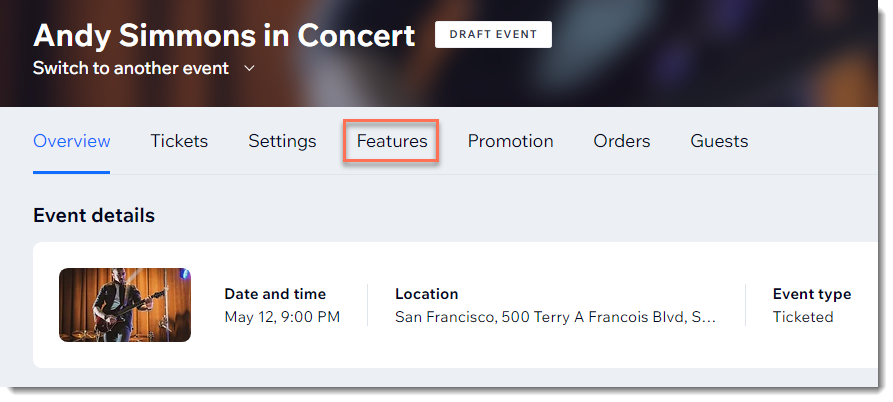
A screenshot of the Features tab for an event in a site's dashboard.

Need A Professional Website?
Contact Us 
Today!

Troubleshooting Third Party Provider Connection Issues

Connecting GB Prime Pay as a Payment Provider

Payze No Longer Available to Connect as a Payment Provider

Connecting Pagsmile as a Payment Provider

Connecting Rakuten as a Payment Method (through KOMOJU)

Receiving Payouts from Third-Party Payment Providers

Connecting Paidy as a Payment Method (through KOMOJU)

Connecting Param as a Payment Provider

Connecting HitPay as a Payment Provider

Connecting MagicPay as a Payment Provider

Connecting Payflex as a Payment Provider

Connecting Paytm for Business as a Payment Provider

Connecting Opn Payments as a Payment Provider

Connecting PayWay by Hrvatski Telekom as a Payment Provider

Connecting CoinGate as a Payment Provider for Cryptocurrency Payments

Connecting Vyne as a Payment Provider

Connecting iKhokha as a Payment Provider

Connecting Triple-A Crypto Payment Gateway as a Payment Provider

Connecting Payzone as a Payment Provider

Connecting Payguru as a Payment Provider

Connecting Grow by Meshulam as a Payment Provider

Refunding Your Customers with Third Party Payment Providers

Connecting PayZen by Lyra as a Payment Provider

Connecting Twint (Provided by PEND) as a Payment Provider

Connecting Pelecard as a Payment Provider

Connecting Dragonpay as a Payment Provider

Connecting Cashfree Payments as a Payment Provider

Connecting Priority Payments as a Payment Provider

Connecting Sipay as a Payment Provider

Connecting Nuvei as a Payment Provider

wix experts
Graphic2Traffic web design
©
bottom of page