top of page

Setting up Wix Events

Wix Events: Adding Additional Event Pages to Your Site

Add as many event pages as you need to a site. You can customize event listings to display different types of events on separate pages, such as upcoming events on one page and promotional events on another.

A screenshot of a site with multiple event pages.

Step 1 | (Optional) Add a new site page

When you add an event list to a site, it's added to whatever page you're on. If you want to place it on a new page, add that page and give it a suitable name.

You can add a new page from the Wix Editor or Studio Editor.

Wix Editor

Studio Editor

  1. Go to your editor.

  2. Click Pages & Menu  on the left side of the editor.

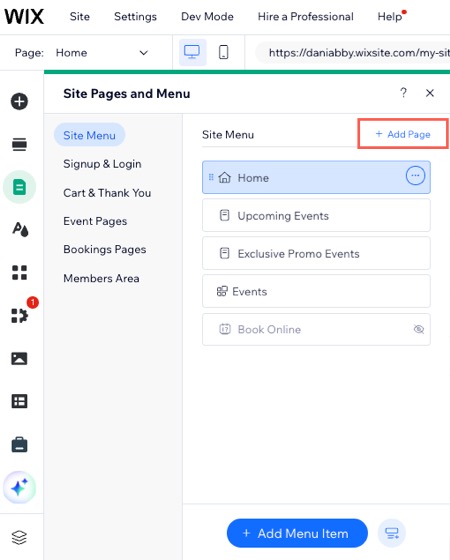
  3. Click + Add Page at the top.

A screenshot of the Pages & Menu panel in the Wix Editor.

Step 2 | Add an event list to an existing page

Add the Events widget to an existing site page to showcase your events, making it easier to get them noticed.

Wix Editor

Studio Editor

  1. Go to your editor.

  2. Go to the page where you want to add an event list.

  3. Click Add Elements  on the left side of the editor.

  4. Click Events.

  5. Drag the relevant Event list onto your page.
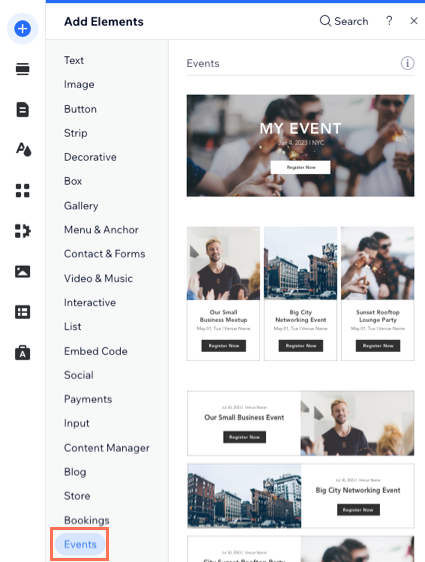
A screenshot ofd the Add Elements panel where you can add an event list to any site page in the Wix Editor.

Need A Professional Website?
Contact Us 
Today!

Connecting Authorize.net Powered by Bankful as a Payment Provider

Connecting Klarna as a Payment Provider

Connecting SeerBit as a Payment Provider

Connecting Webpay Plus-Transbank as a Payment Provider

Connecting Atome as a Payment Provider

Connecting Affirm as a Payment Provider

Connecting Pay TR as a Payment Provider

Connecting Sezzle as a Payment Provider

Connecting CXPay as a Payment Provider

Connecting Afterpay as a Payment Provider

Connecting Rapyd Payments as a Payment Provider

Connecting Clearpay as a Payment Provider

Connecting Yoco as a Payment Provider

Connecting Titre Restaurants Conecs as a Payment Method (Through Lyra)

Connecting Multibanco as a Payment Method (Through Lyra Collect)

Connecting Fondy as a Payment Provider

Connecting Xendit as a Payment Provider

Connecting Razorpay as a Payment Provider

Connecting Laybuy as a Payment Provider

Connecting Lyra Collect as a Payment Provider

Connecting UAPay as a Payment Provider

Connecting Paysafecash as a Payment Method (through Skrill)

Connecting Rapid Transfer as a Payment Method (through Skrill)

Connecting Przelewy24 as a Payment Method (through Skrill)

Connecting Skrill Digital Wallet as a Payment Method

Connecting Skrill as a Payment Provider for Credit/Debit Card Transactions

Connecting Mobile Payment as a Payment Method (Through KOMOJU)

Connecting Pay-Easy as a Payment Method (Through KOMOJU)

Connecting WeChat Pay as a Payment Method (Through Oceanpayment)

Connecting AliPay as a Payment Method (Through Oceanpayment)

wix experts
Graphic2Traffic web design
©
bottom of page