top of page

Creating your event

Wix Events: Adding a Policy Checkbox

You can add a policy checkbox that your guests see during checkout. Guests must agree to your policies to register for an event.
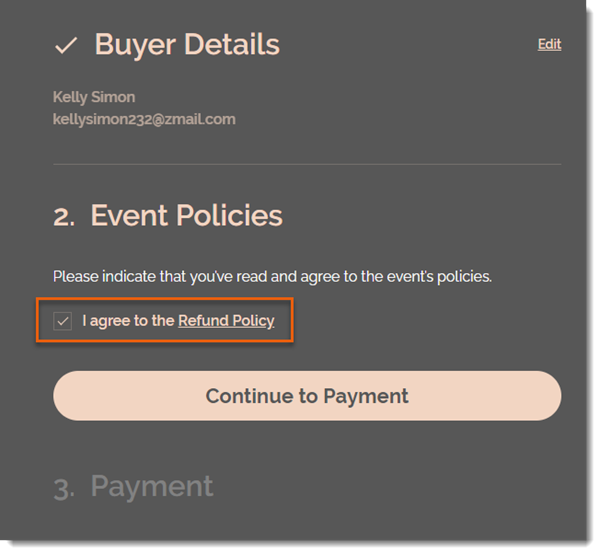
To add a policy checkbox:

  1. Go to Events in your site's dashboard.

  2. Select the relevant event.

  3. Click the Settings tab.

  4. Click Edit next to Event Policies.

  5. Scroll down and click Edit next to Event Policies.

  6. Click Create Policy.

  7. Enter a policy name (e.g. Refund Policy).

  8. Enter the policy details (e.g. You can receive a full refund up to 7 days before the event).
    Note: Guests can click the link to read your policy.

  9. Click Create Policy.

  10. (Optional) Click +Add Custom Policy and repeat steps 6 and 7 to add an additional policy.

Note:

You can add up to 3 policies. The checkbox applies to all the policies you add. It's not possible to add a separate checkbox for each policy.

Need A Professional Website?
Contact Us 
Today!

Connecting Authorize.net Powered by Bankful as a Payment Provider

Connecting Klarna as a Payment Provider

Connecting SeerBit as a Payment Provider

Connecting Webpay Plus-Transbank as a Payment Provider

Connecting Atome as a Payment Provider

Connecting Affirm as a Payment Provider

Connecting Pay TR as a Payment Provider

Connecting Sezzle as a Payment Provider

Connecting CXPay as a Payment Provider

Connecting Afterpay as a Payment Provider

Connecting Rapyd Payments as a Payment Provider

Connecting Clearpay as a Payment Provider

Connecting Yoco as a Payment Provider

Connecting Titre Restaurants Conecs as a Payment Method (Through Lyra)

Connecting Multibanco as a Payment Method (Through Lyra Collect)

Connecting Fondy as a Payment Provider

Connecting Xendit as a Payment Provider

Connecting Razorpay as a Payment Provider

Connecting Laybuy as a Payment Provider

Connecting Lyra Collect as a Payment Provider

Connecting UAPay as a Payment Provider

Connecting Paysafecash as a Payment Method (through Skrill)

Connecting Rapid Transfer as a Payment Method (through Skrill)

Connecting Przelewy24 as a Payment Method (through Skrill)

Connecting Skrill Digital Wallet as a Payment Method

Connecting Skrill as a Payment Provider for Credit/Debit Card Transactions

Connecting Mobile Payment as a Payment Method (Through KOMOJU)

Connecting Pay-Easy as a Payment Method (Through KOMOJU)

Connecting WeChat Pay as a Payment Method (Through Oceanpayment)

Connecting AliPay as a Payment Method (Through Oceanpayment)

wix experts
Graphic2Traffic web design
©
bottom of page