top of page

Creating your event

Wix Events: Adding a Policy Checkbox

You can add a policy checkbox that your guests see during checkout. Guests must agree to your policies to register for an event.
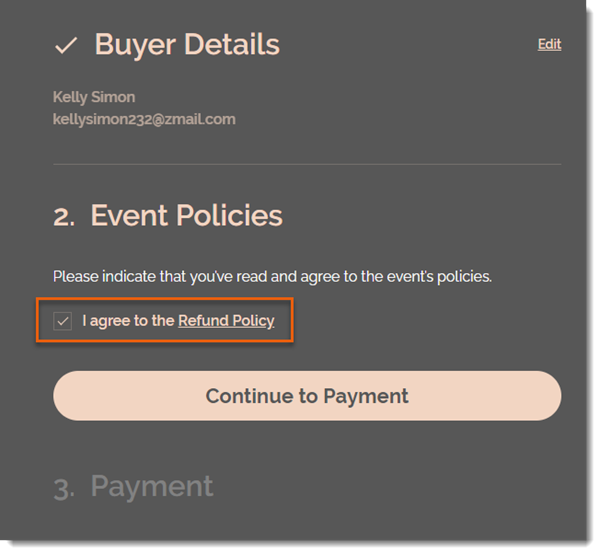
To add a policy checkbox:

  1. Go to Events in your site's dashboard.

  2. Select the relevant event.

  3. Click the Settings tab.

  4. Click Edit next to Event Policies.

  5. Scroll down and click Edit next to Event Policies.

  6. Click Create Policy.

  7. Enter a policy name (e.g. Refund Policy).

  8. Enter the policy details (e.g. You can receive a full refund up to 7 days before the event).
    Note: Guests can click the link to read your policy.

  9. Click Create Policy.

  10. (Optional) Click +Add Custom Policy and repeat steps 6 and 7 to add an additional policy.

Note:

You can add up to 3 policies. The checkbox applies to all the policies you add. It's not possible to add a separate checkbox for each policy.

Need A Professional Website?
Contact Us 
Today!

Setting Up Tax Groups Using Automatic Tax Calculation

Setting Up Automatic Tax Calculation

About Automatic Tax Collection

Setting Up Tax Groups Using Manual Tax Calculation

Setting Up Tax Calculation Using the Manual Method

Tax Collection: An Overview

Connecting Flow as a Payment Provider

Connecting Tranzzo as a Payment Provider

Syncing SKU IQ with Square and Wix

Connecting iCredit as a Payment Provider

Connecting Cal powered by PayMe as a Payment Provider

Connecting Pagopar as a Payment Provider

Connecting POLi as a Payment Provider

Connecting PaidBy Bank as a Payment Provider

Connecting PostFinance as a Payment Provider

Connecting Nimbbl as a Payment Provider

Connecting airpay as a Payment Provider

Connecting Easebuzz as a Payment Provider

Connecting MakeCommerce as a Payment Provider

Connecting KG Inicis as a Payment Provider

Connecting seQura as a Payment Provider

About 3D Secure (3DS) Payments with Third-Party Payment Providers

Connecting Ziina as a Payment Provider

Connecting Faster Payment System as a payment method (through Oceanpayment)

Connecting easypay as a Payment Provider

Connecting Exactly as a Payment Provider

Connecting PayItMonthly as a Payment Provider

Troubleshooting Pending PayPal Payments

Connecting Tranzila as a Payment Provider for Card, Google Pay and bit Payments

Connecting Moneris as a Payment Provider

wix experts
Graphic2Traffic web design
©
bottom of page