top of page

Using the Wix app to manage your bookings

Wix Bookings: Managing Your Business Hours Using the Wix App

Manage your business hours on the go using the Wix app, so both members and staff know when they can book sessions. After setting your default business hours, you can add specific hours for individual staff members.

In this article, learn more about:

Setting your default business hours

Let your clients know what your opening hours are by setting your default business hours.

Tip:

You can also create custom working hours for your staff members outside your regular hours of business.

To set your default business hours:

  1. Go to your site in the Wix app.

  2. Tap Manage  at the bottom.

  3. Scroll down and tap Settings.

  4. Tap Booking Settings.

  5. Tap Default Hours.

  6. Select the checkboxes next to each day your business is open.

  7. Enter a default start and end time for each day (e.g. 9:00 AM to 6:00 PM).
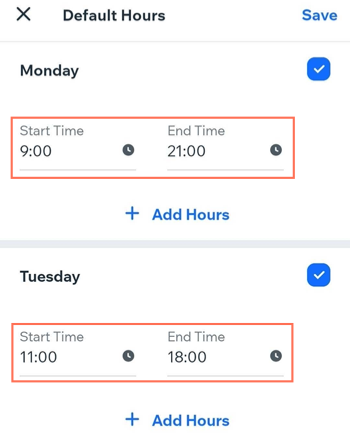
Screenshot showing how to set your default hours in the Wix Owner app.

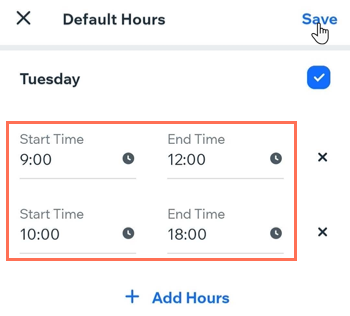
  1. (Optional) Add another time period if your business closes at any point during the day:Tap + Add Hours.
    Enter a start and end time. (e.g. 9:00 AM - 12:00 PM and 1:00 PM - 6:00 PM).

  2. Tap Save.

Screenshot showing how to add different periods of opening hours on the same day in the Wix Owner app.

Checking business hours on your site

After you set your staff and default business hours, your members can visit your site on a desktop or mobile device, select a service and a staff member, and see which spots are available.
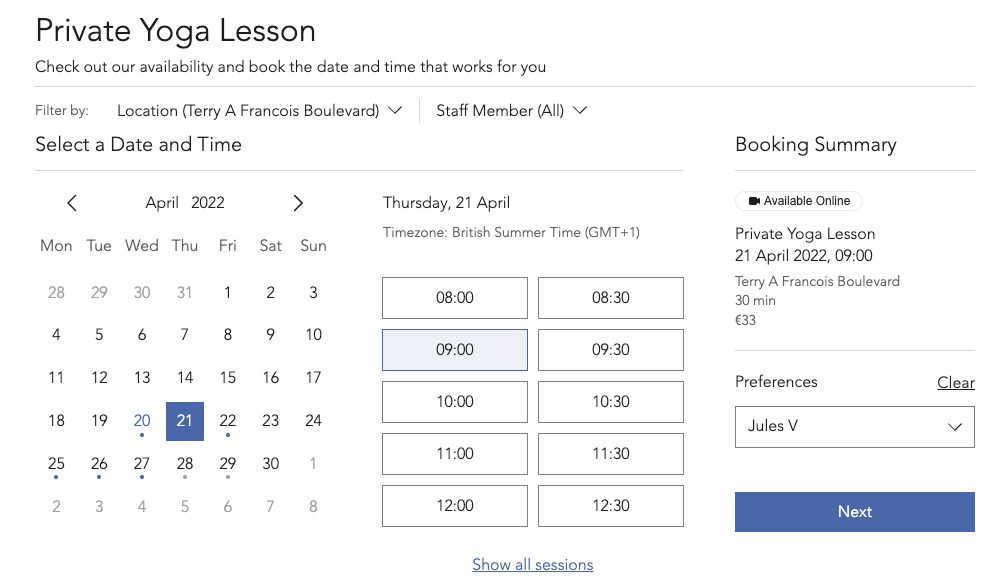
Screenshot of how default hours show up and look when trying to book available sites.

Need A Professional Website?
Contact Us 
Today!

Setting Up Tax Groups Using Automatic Tax Calculation

Setting Up Automatic Tax Calculation

About Automatic Tax Collection

Setting Up Tax Groups Using Manual Tax Calculation

Setting Up Tax Calculation Using the Manual Method

Tax Collection: An Overview

Connecting Flow as a Payment Provider

Connecting Tranzzo as a Payment Provider

Syncing SKU IQ with Square and Wix

Connecting iCredit as a Payment Provider

Connecting Cal powered by PayMe as a Payment Provider

Connecting Pagopar as a Payment Provider

Connecting POLi as a Payment Provider

Connecting PaidBy Bank as a Payment Provider

Connecting PostFinance as a Payment Provider

Connecting Nimbbl as a Payment Provider

Connecting airpay as a Payment Provider

Connecting Easebuzz as a Payment Provider

Connecting MakeCommerce as a Payment Provider

Connecting KG Inicis as a Payment Provider

Connecting seQura as a Payment Provider

About 3D Secure (3DS) Payments with Third-Party Payment Providers

Connecting Ziina as a Payment Provider

Connecting Faster Payment System as a payment method (through Oceanpayment)

Connecting easypay as a Payment Provider

Connecting Exactly as a Payment Provider

Connecting PayItMonthly as a Payment Provider

Troubleshooting Pending PayPal Payments

Connecting Tranzila as a Payment Provider for Card, Google Pay and bit Payments

Connecting Moneris as a Payment Provider

wix experts
Graphic2Traffic web design
©
bottom of page