top of page

Emails, SMS, and promotions

Wix Bookings: Managing Email Notifications You Receive

When one of your clients books or cancels a service, Wix emails you, your client and the staff member providing the service.

Notes:

  • You do not receive email notifications for bookings made in preview mode while you're working on your site.

  • If you're using a merchant account (e.g. PayPal, Stripe, Authorize.net), the email notification goes to the email address associated with that account.
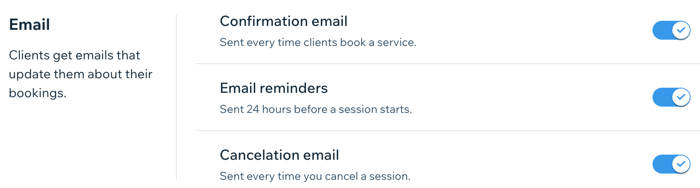
A screenshot showing the email settings section of the dashboard for Wix Bookings.

In this article, learn more about:

Activating email notifications for new bookings

Make sure you never miss a new booking by activating email notifications in the Booking settings section of the dashboard.

Note:

Notification emails for you and your staff go to the addresses in the Business Info and Staff tabs in the dashboard. Make these email addresses are up-to-date, so you and your staff receive the relevant client emails.

To activate email notifications for new bookings:

  1. Go to the Booking Settings tab.

  2. Click Emails & SMS reminders.

  3. Enable the toggle next to New booking emails.
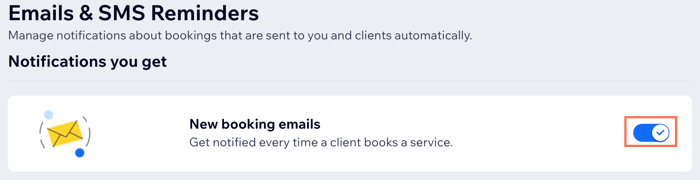
A screenshot showing how to activate email notifications for new bookings received.

Disabling email notifications for your staff

Your staff may not need to receive email notifications about their upcoming bookings. For example, if you have an administrator who handles all bookings for your staff. You can disable your staff members' email notifications from the Staff tab in the dashboard.

Important:

If you delete their email from the Staff tab, your staff member won't receive any email notifications for new bookings, rescheduled sessions or cancellations.

To disable email notifications for your staff:

  1. Go to Staff in your site's dashboard.

  2. Hover over the relevant staff member and click Edit.

  3. Delete their email address from the Email field.

  4. Click Save.

  5. Repeat steps 2 - 4 for all relevant staff members.
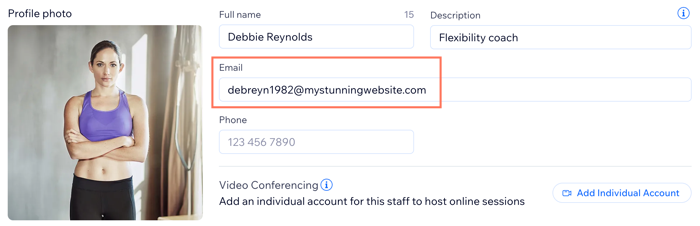
Screenshot showing how to remove a staff member's email address so they no longer receive bookings notification emails.

Need A Professional Website?
Contact Us 
Today!

Google Workspace Error Message: "Your subscription has been suspended by your reseller"

Google Workspace Error Message: Service Is Temporarily Suspended until Your Customer Accepts the New Terms of Service

Google Workspace Error Message: "You already have a Google Workspace business email account. You can manage it from the Google Admin Console"

Google Workspace: Data Migration from an External Email to Your Google Workspace

Google Workspace: Revoking Admin Status to Delete a Workspace Account

Google Workspace: Connecting Your Business Email to a Mail Client Using IMAP and SMTP

Google Workspace: Changing the Language of Your Business Email

Google Workspace: Emails Missing from Your Business Email

Google Workspace: Allowing Access for ‘Less Secure Apps’ in Your Business Email

Google Workspace: Adding Google Workspace MX Records to Your Wix Account

Google Workspace: Setting Up a Domain Alias

Google Workspace: Manually Verifying Your Domain with Google

Google Workspace: Connecting a Business Email for a Domain Pointing to Wix

Google Workspace: Setting Up an Email Alias for an Existing Workspace User Email Address

Google Workspace: Resetting a Workspace User's Password

Google Workspace: Renaming a Workspace User

Google Workspace: Accessing Your Additional Workspace Users

Google Workspace: Purchasing Additional Business Emails from Wix

Google Workspace: Setting Up Business Email Users

Gemini for Google Workspace: An Overview

Google Workspace: Upgrading a Workspace Plan

Google Workspace: Choosing a Plan

Google Workspace: Business Email Sending Limits

Google Workspace: Forwarding Emails From Your Business Email to Another Email Address

Google Workspace: Resetting Your Admin Password

Google Workspace: Accessing Your Admin Console

Google Workspace: Identifying Your Admin Workspace User

Google Workspace: Setting Up Your Business Email on Mobile Devices

Google Workspace: Username and Password Guidelines

Google Workspace: Accessing your Business Email Through Your Wix Account

wix experts
Graphic2Traffic web design
©
bottom of page