top of page

Creating Your Services

Wix Bookings: Making Services Unbookable

You may want to prevent clients from booking services. To do so, you have a number of options:

In this article, learn how to:

Creating a view-only service

A view-only service shows site visitors all the relevant information about your service, but displays a "More Info" button instead of a "Book It" button. The service cannot be booked through your site.

Learn how to create view-only services.
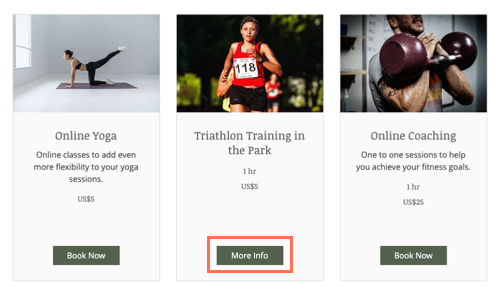
A screenshot showing the More Info button on the service page, instead of the book now button.

Requiring approval for appointments in Wix Bookings

You can let clients put in a booking request, and then approve or decline it. This give you complete control over which bookings you want to accept.

Learn how to require approval for appointments.

A screenshot showing the request to book button on the service page.

Hiding a service from your site

If you don't want clients to view a service, you can hide it from your site. When you're ready, you can unhide the service to allow clients to book.

To hide a service from your site:

  1. Go to Booking Services in your site's dashboard.

  2. Hover over the relevant service.

  3. Click the More Actions icon and select Hide from site.

A screenshot showing how to hide a service in the Bookings Services tab of the dashboard.

Note:

Hiding a service does not cancel existing bookings. Learn how to cancel sessions and refund your clients.

Deleting a service

If you no longer want to offer a particular service, you can delete it. If the service is connected to a pricing plan (a membership plan or package), deleting the service disconnects it.

Learn how to delete a service from your site.

A screenshot of how to delete a service in the Bookings Services tab of the dashboard.

Need A Professional Website?
Contact Us 
Today!

Google Workspace Error Message: "Your subscription has been suspended by your reseller"

Google Workspace Error Message: Service Is Temporarily Suspended until Your Customer Accepts the New Terms of Service

Google Workspace Error Message: "You already have a Google Workspace business email account. You can manage it from the Google Admin Console"

Google Workspace: Data Migration from an External Email to Your Google Workspace

Google Workspace: Revoking Admin Status to Delete a Workspace Account

Google Workspace: Connecting Your Business Email to a Mail Client Using IMAP and SMTP

Google Workspace: Changing the Language of Your Business Email

Google Workspace: Emails Missing from Your Business Email

Google Workspace: Allowing Access for ‘Less Secure Apps’ in Your Business Email

Google Workspace: Adding Google Workspace MX Records to Your Wix Account

Google Workspace: Setting Up a Domain Alias

Google Workspace: Manually Verifying Your Domain with Google

Google Workspace: Connecting a Business Email for a Domain Pointing to Wix

Google Workspace: Setting Up an Email Alias for an Existing Workspace User Email Address

Google Workspace: Resetting a Workspace User's Password

Google Workspace: Renaming a Workspace User

Google Workspace: Accessing Your Additional Workspace Users

Google Workspace: Purchasing Additional Business Emails from Wix

Google Workspace: Setting Up Business Email Users

Gemini for Google Workspace: An Overview

Google Workspace: Upgrading a Workspace Plan

Google Workspace: Choosing a Plan

Google Workspace: Business Email Sending Limits

Google Workspace: Forwarding Emails From Your Business Email to Another Email Address

Google Workspace: Resetting Your Admin Password

Google Workspace: Accessing Your Admin Console

Google Workspace: Identifying Your Admin Workspace User

Google Workspace: Setting Up Your Business Email on Mobile Devices

Google Workspace: Username and Password Guidelines

Google Workspace: Accessing your Business Email Through Your Wix Account

wix experts
Graphic2Traffic web design
©
bottom of page