top of page

Creating Your Services

Wix Bookings: Making Services Unbookable

You may want to prevent clients from booking services. To do so, you have a number of options:

In this article, learn how to:

Creating a view-only service

A view-only service shows site visitors all the relevant information about your service, but displays a "More Info" button instead of a "Book It" button. The service cannot be booked through your site.

Learn how to create view-only services.
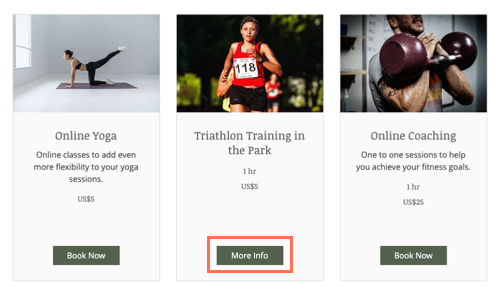
A screenshot showing the More Info button on the service page, instead of the book now button.

Requiring approval for appointments in Wix Bookings

You can let clients put in a booking request, and then approve or decline it. This give you complete control over which bookings you want to accept.

Learn how to require approval for appointments.

A screenshot showing the request to book button on the service page.

Hiding a service from your site

If you don't want clients to view a service, you can hide it from your site. When you're ready, you can unhide the service to allow clients to book.

To hide a service from your site:

  1. Go to Booking Services in your site's dashboard.

  2. Hover over the relevant service.

  3. Click the More Actions icon and select Hide from site.

A screenshot showing how to hide a service in the Bookings Services tab of the dashboard.

Note:

Hiding a service does not cancel existing bookings. Learn how to cancel sessions and refund your clients.

Deleting a service

If you no longer want to offer a particular service, you can delete it. If the service is connected to a pricing plan (a membership plan or package), deleting the service disconnects it.

Learn how to delete a service from your site.

A screenshot of how to delete a service in the Bookings Services tab of the dashboard.

Need A Professional Website?
Contact Us 
Today!

Setting Up Tax Groups Using Automatic Tax Calculation

Setting Up Automatic Tax Calculation

About Automatic Tax Collection

Setting Up Tax Groups Using Manual Tax Calculation

Setting Up Tax Calculation Using the Manual Method

Tax Collection: An Overview

Connecting Flow as a Payment Provider

Connecting Tranzzo as a Payment Provider

Syncing SKU IQ with Square and Wix

Connecting iCredit as a Payment Provider

Connecting Cal powered by PayMe as a Payment Provider

Connecting Pagopar as a Payment Provider

Connecting POLi as a Payment Provider

Connecting PaidBy Bank as a Payment Provider

Connecting PostFinance as a Payment Provider

Connecting Nimbbl as a Payment Provider

Connecting airpay as a Payment Provider

Connecting Easebuzz as a Payment Provider

Connecting MakeCommerce as a Payment Provider

Connecting KG Inicis as a Payment Provider

Connecting seQura as a Payment Provider

About 3D Secure (3DS) Payments with Third-Party Payment Providers

Connecting Ziina as a Payment Provider

Connecting Faster Payment System as a payment method (through Oceanpayment)

Connecting easypay as a Payment Provider

Connecting Exactly as a Payment Provider

Connecting PayItMonthly as a Payment Provider

Troubleshooting Pending PayPal Payments

Connecting Tranzila as a Payment Provider for Card, Google Pay and bit Payments

Connecting Moneris as a Payment Provider

wix experts
Graphic2Traffic web design
©
bottom of page