top of page

Additional Wix Apps

Wix Apps: Task List

The Wix Task List add-on enables you to set up and monitor a list of tasks to complete while working on your site. Think of it like a to-do list that's integrated into your site just for you or your co-workers.

A screenshot showing the Task List add on inside the Studio Editor.

To add the Task List add-on to your site:

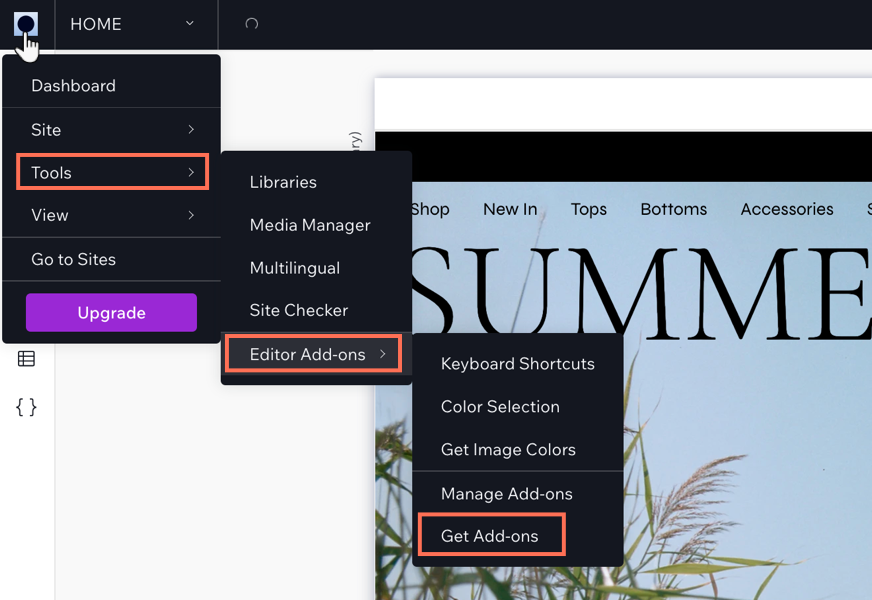
  1. Click the Wix Studio icon  at the top left.

  2. Click Tools.

  3. Click Editor Add-ons.

  4. Click Get Add-ons.

  5. Hover over Task List and click Add.

A screenshot showing the Wix Studio icon and the option to get add-ons.

Once you have added Task List, you can start creating tasks for yourself. When you have finished a task, select the checkmark next to the relevant task and it will move to your 'Completed tasks' section in the add-on.

Need A Professional Website?
Contact Us 
Today!

Wix Photo Albums: Printing and Shipping Issues in the Wix Photo Albums Store

Wix Photo Albums: Printing and Shipping Issues in the Wix Photo Albums Store

Wix Photo Albums: Setting Up Your Photo Albums Store

Wix Photo Albums Store: No Longer Available

Wix Photo Albums: Managing Your Photo Album

Wix Photo Albums: Managing Photo Albums in the Wix App

Wix Photo Albums: Duplicating Your Photo Album

Wix Photo Albums: Changing Your Album's Privacy Permissions

Wix Photo Albums: Enabling Downloading of an Entire Photo Album

Wix Photo Albums: Changing the Album URL

Wix Photo Albums: Troubleshooting Album URL Issues

Wix Photo Albums: Displaying Specific Albums on Different Pages

Wix Photo Albums: Showing or Hiding an Album on Your Site

Wix Photo Albums: Sharing Your Album

Wix Photo Albums: Displaying a Single Photo Album

Wix Photo Albums: Supported Media Sizes and Formats

Wix Photo Albums: Deleting Photo Albums

Wix Photo Albums: Adding New Galleries to an Album

Wix Photo Albums: Changing the Layout of Your Galleries

Wix Photo Albums: Creating a Favorites List for Clients (Proofing)

Wix Photo Albums: Managing Your Favorites Lists

Wix Photo Albums: Communicating With Clients Using Your Favorites List

Wix Photo Albums: Updating Your Old Albums to the New Templates

Wix Photo Albums: Uploading Photos from Lightroom Classic

Wix Photo Albums: Viewing Your Photo Album Statistics

Wix Photo Albums: Upgrading Your Photo Albums Storage

Wix Photo Albums: Removing Wix Ads from Your Photo Album

Wix Photo Albums: Organizing Your Album

Wix Photo Albums: Adding Titles and Descriptions to Photos

Wix Photo Albums: Editing Your Album's Cover Information

wix experts
Graphic2Traffic web design
©
bottom of page