top of page

Additional Wix Apps

Wix Apps: Design Guides

The Wix Design Guides add-on lets you create rows, columns or cells in your Studio Editor to help structure and design your site in a more organized manner.

The guide appears on your Editor as a colored grid, it does not appear on your live site. The purpose of this is to guide you as you place your elements on your site and make sure everything is aligned correctly.

Wix Design Guides is only available in the Wix Studio Editor.

A screenshot showing the Design Guides panels.

In this article, learn more about:

Adding Wix Design Guides to your site

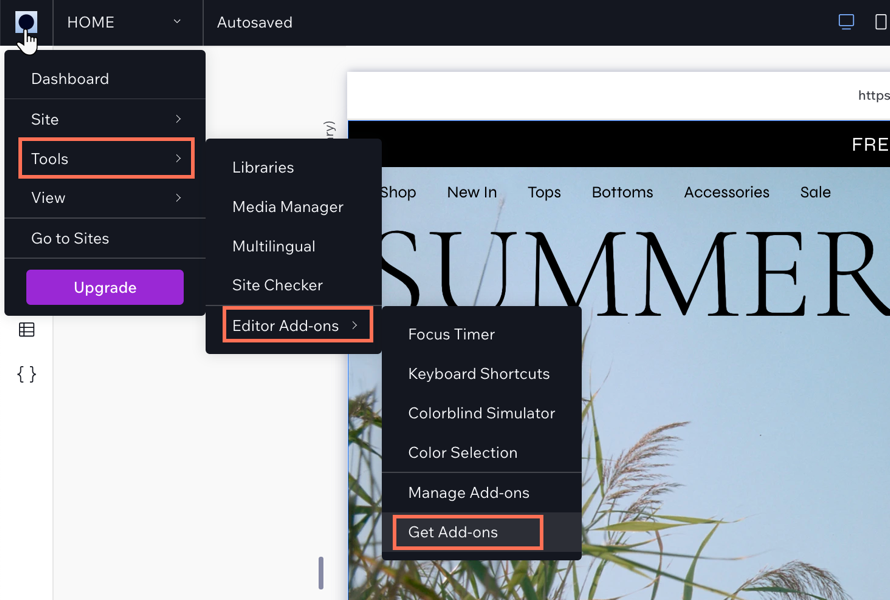
Add the Wix Design Guides add-on from the tools in your Studio Editor.

To add Wix Design Guides:

  1. Click the Wix Studio icon  at the top left.

  2. Click Tools.

  3. Click Editor Add-ons.

  4. Click Get Add-ons.

  5. Click Design Guides.

A screenshot showing the Wix Studio icon and the options to add Editor Add-ons to your site.

Customizing your Design Guide settings

Customize your grid to get the exact layout you want. You can make changes to the number of columns or rows in a grid, and change their size and spacing etc. The settings change depending on the grid type you choose.

To customize the settings:

  1. Click the Wix Studio icon  at the top left.

  2. Click Tools.

  3. Click Editor Add-ons.

  4. Click Design Guides.

  5. Click the drop-down icon  next to columns to display the settings.

  6. Choose what you want to customize:Type of guide: Click the drop-down icon  and choose a guide.
    Alignment: Set the alignment, stretch, left, right, or center.
    Columns: Enter the amount of columns you need for your guide.
    Margin width: Set the width of the margin.
    Gutter width: Set the gutter width. This is the space between the columns.
    Column width: Depending on your alignment, the column width maybe set to Auto.
    Opacity and Color: Set a color for your columns and the adjust the opacity.

  7. (Optional): Click Add Guide to add a new guide to your site.
    Note: This layers the guides on top of each other so the pink lines are more visible as you edit.
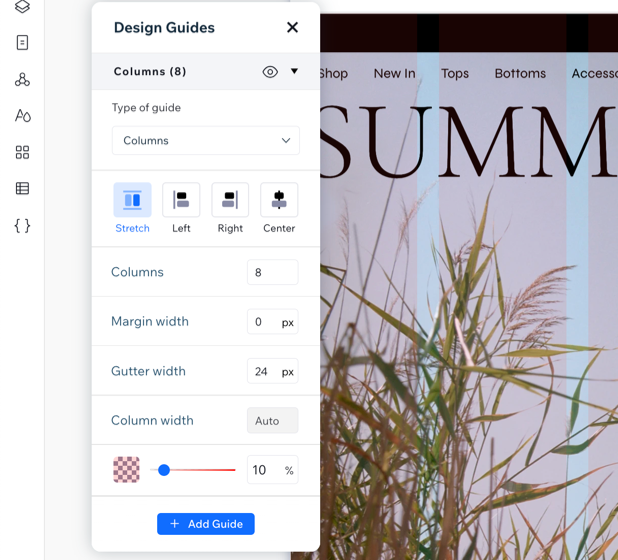
A screenshot showing the design settings for the Design Guides Add-on.

Need A Professional Website?
Contact Us 
Today!

Google Workspace Error Message: "Your subscription has been suspended by your reseller"

Google Workspace Error Message: Service Is Temporarily Suspended until Your Customer Accepts the New Terms of Service

Google Workspace Error Message: "You already have a Google Workspace business email account. You can manage it from the Google Admin Console"

Google Workspace: Data Migration from an External Email to Your Google Workspace

Google Workspace: Revoking Admin Status to Delete a Workspace Account

Google Workspace: Connecting Your Business Email to a Mail Client Using IMAP and SMTP

Google Workspace: Changing the Language of Your Business Email

Google Workspace: Emails Missing from Your Business Email

Google Workspace: Allowing Access for ‘Less Secure Apps’ in Your Business Email

Google Workspace: Adding Google Workspace MX Records to Your Wix Account

Google Workspace: Setting Up a Domain Alias

Google Workspace: Manually Verifying Your Domain with Google

Google Workspace: Connecting a Business Email for a Domain Pointing to Wix

Google Workspace: Setting Up an Email Alias for an Existing Workspace User Email Address

Google Workspace: Resetting a Workspace User's Password

Google Workspace: Renaming a Workspace User

Google Workspace: Accessing Your Additional Workspace Users

Google Workspace: Purchasing Additional Business Emails from Wix

Google Workspace: Setting Up Business Email Users

Gemini for Google Workspace: An Overview

Google Workspace: Upgrading a Workspace Plan

Google Workspace: Choosing a Plan

Google Workspace: Business Email Sending Limits

Google Workspace: Forwarding Emails From Your Business Email to Another Email Address

Google Workspace: Resetting Your Admin Password

Google Workspace: Accessing Your Admin Console

Google Workspace: Identifying Your Admin Workspace User

Google Workspace: Setting Up Your Business Email on Mobile Devices

Google Workspace: Username and Password Guidelines

Google Workspace: Accessing your Business Email Through Your Wix Account

wix experts
Graphic2Traffic web design
©
bottom of page