top of page

Adding and managing apps

Upgrading an App from the Wix App Market

Many of the apps in the Wix App Market are completely free for you to use. Some apps offer a free version along with an upgrade option to a premium version to access the full range of features.

You can upgrade your apps in your site's editor or in your dashboard.

In this article, learn how to upgrade an app:

Upgrading an app in your site's Editor

  1. Click the app in your editor.

  2. Click Settings.

  3. Click Upgrade.

A screenshot showing the option to upgrade.

  1. Select your payment plan.

  2. Select your subscription period.

  3. Click Next.

  4. Enter your payment information.

  5. Click Submit Purchase.

Upgrading an app in your dashboard

  1. Go to Manage Apps in your site's dashboard.

  2. Click Upgrade next to the app you want to upgrade.
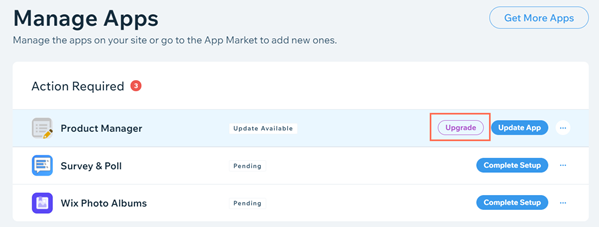
A screenshot showing the option to upgrade.

  1. Select your payment plan.

  2. Select your subscription period.

  3. Click Next.

  4. Enter your payment information.

  5. Click Submit Purchase.

Important:

After submitting your purchase, your bank may require you to verify your identity. If you're experiencing any issues with the authentication process, contact your bank directly.

FAQs

Click a question below to learn more about upgrading a third-party app.

How am I charged for an app upgrade?

Upgrading a third-party app is a subscription service that is renewed automatically, on a monthly basis.

You are charged for the app subscription each month, until you decide to cancel the service.

Are these upgrades included in my Premium plan?

No. Many of the apps in the Wix App Market have been developed by third-party developers. As such, the upgraded versions of these apps are not included in the Wix Premium plan offerings.

Need A Professional Website?
Contact Us 
Today!

Connecting Authorize.net Powered by Bankful as a Payment Provider

Connecting Klarna as a Payment Provider

Connecting SeerBit as a Payment Provider

Connecting Webpay Plus-Transbank as a Payment Provider

Connecting Atome as a Payment Provider

Connecting Affirm as a Payment Provider

Connecting Pay TR as a Payment Provider

Connecting Sezzle as a Payment Provider

Connecting CXPay as a Payment Provider

Connecting Afterpay as a Payment Provider

Connecting Rapyd Payments as a Payment Provider

Connecting Clearpay as a Payment Provider

Connecting Yoco as a Payment Provider

Connecting Titre Restaurants Conecs as a Payment Method (Through Lyra)

Connecting Multibanco as a Payment Method (Through Lyra Collect)

Connecting Fondy as a Payment Provider

Connecting Xendit as a Payment Provider

Connecting Razorpay as a Payment Provider

Connecting Laybuy as a Payment Provider

Connecting Lyra Collect as a Payment Provider

Connecting UAPay as a Payment Provider

Connecting Paysafecash as a Payment Method (through Skrill)

Connecting Rapid Transfer as a Payment Method (through Skrill)

Connecting Przelewy24 as a Payment Method (through Skrill)

Connecting Skrill Digital Wallet as a Payment Method

Connecting Skrill as a Payment Provider for Credit/Debit Card Transactions

Connecting Mobile Payment as a Payment Method (Through KOMOJU)

Connecting Pay-Easy as a Payment Method (Through KOMOJU)

Connecting WeChat Pay as a Payment Method (Through Oceanpayment)

Connecting AliPay as a Payment Method (Through Oceanpayment)

wix experts
Graphic2Traffic web design
©
bottom of page