top of page

Setting rates & payments

Setting a Weekly or Monthly Rate in Wix Hotels

Important:

This article refers to the original Wix Hotels. If you are using the new Wix Hotels by HotelRunner, which is not yet available to all users, please read the information here. Learn how to check which version of Wix Hotels you are using.

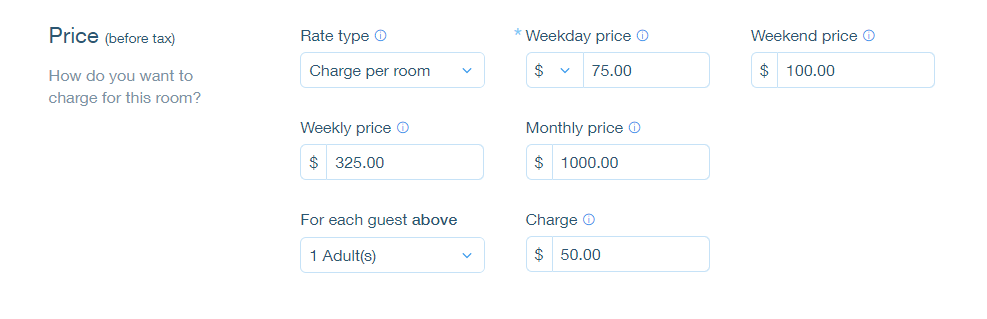
The weekly rate is the rate a guest pays when booking for 7 nights. The monthly rate is the rate a guest pays when booking for 28 nights. Wix Hotels allows you to set the rate at which you want to charge your an individual unit.

To set weekly or monthly rates:

  1. Go to your dashboard.

  2. Click the Hotels tab.

  3. Click the Rooms tab.

  4. Click the Edit icon for an existing room or click Create New to add a new one.

  5. Scroll down to the Price section.

  6. Click More Pricing Options.

  7. Enter the weekly and/or monthly price.

  8. Click Save.

Tip:

  • If a guest books for 8 nights, the rate is calculated as the weekly rate + the daily or weekend rate.

  • If a guest books for 29 nights, the rate is calculated as the monthly rate + the daily or weekend rate.

Need A Professional Website?
Contact Us 
Today!

Wix Stores: SEO for Product Pages

Wix Stores: Product Gallery Images Appear Cropped on Mobile Devices

Wix Stores: Adding Info Sections to Products

Wix Stores: Adding Images, GIFs, and Videos to Products

Wix Stores: Adding and Customizing Product Options

Wix Stores: Creating a Digital Product

Wix Stores: Creating a Physical Product

Using AI to Create an Online Store

Wix Stores: Deleting Wix Stores

Wix Stores: Limits & Recommended Guidelines

Wix Stores: Importing iZettle Products to Your Store

Wix Stores: Migrating from Other eCommerce Platforms to Wix Stores

Wix Stores: Transferring Your Store to Another Wix Account

Wix Stores: Impact of EU Directive Concerning Online Businesses

Wix Stores: Tracking Sales Using Your Thank You Page URL

Wix Stores: Creating Restricted Store Pages

Wix Stores: Displaying Tax and Shipping Info with Product Prices

Wix Stores: Tracking Sales with a Meta Conversion Pixel

Wix Stores: Setting Up a 301 Redirect to a Specific Product Page

Wix Stores: Changing Your Currency

Wix Stores: Changing the Language of Your Storefront or Dashboard

Wix Stores: About Your Basic Site Info

Wix Stores: Upgrading Your Site's Plan

Wix Stores: About Your Storefront

Wix Stores: The 10 Essential Steps to Creating Your Online Store

Wix Stores: Translating Your Store

Wix Stores: An Overview of Store Features

Wix Stores: Adding Wix Stores

Wix Stores: About Wix Stores

Fit by Wix: Setting Fit by Wix as Your Default Member App

wix experts
Graphic2Traffic web design
©
bottom of page