top of page

Designing your plans pages

Pricing Plans: Editing the Text in Your Pricing Plans Page

You can edit the default header, button and ribbon text in the Pricing Plans app to suit your business and brand.
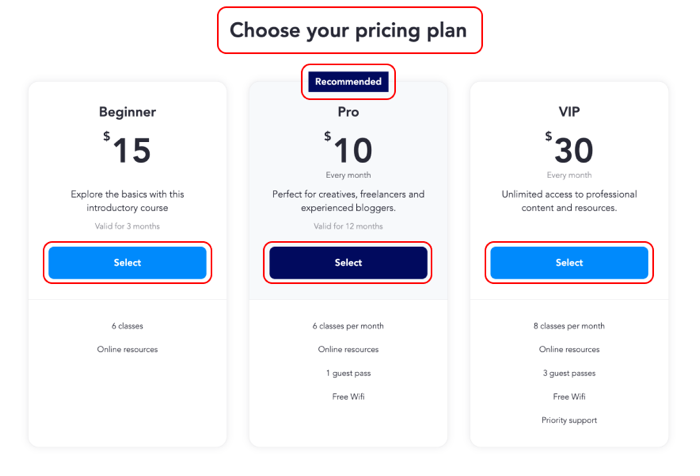
Screenshot showing the pricing plans page on a live site with edited text.

Note:

To edit plan names, descriptions, or benefits, go to the Pricing Plans tab and select the plan you want to edit.

To edit the pricing plan text:

Wix Editor

Go to your editor.

  1. Go to your Plans & Pricing page:Click Pages & Menu  on the left side of the editor.
    Click your Plans & Pricing page.

  2. Click the Plans & Pricing element on your page.

  3. Click Settings.

  4. Click the Text tab on the left.

  5. Edit the following text:Page title: The title that appears above the plans.
    Page subtitle: The subtitle that appears above the plans. Here you can add more details or highlight newer plans, for example.
    Button: The button clients click to select a plan.
    Button (with free trial): The button clients click to select a recurring membership plan that has a free trial.
    Ribbon: The "Best Value" ribbon on the highlighted plan (if a plan is highlighted).
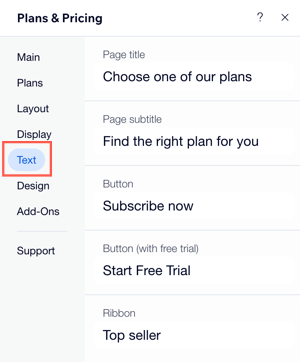
A screenshot showing how to customize the text on the pricing plans element in the editor.

Notes:

It is not possible to edit button text separately for different plans.

Need A Professional Website?
Contact Us 
Today!

Connecting Authorize.net Powered by Bankful as a Payment Provider

Connecting Klarna as a Payment Provider

Connecting SeerBit as a Payment Provider

Connecting Webpay Plus-Transbank as a Payment Provider

Connecting Atome as a Payment Provider

Connecting Affirm as a Payment Provider

Connecting Pay TR as a Payment Provider

Connecting Sezzle as a Payment Provider

Connecting CXPay as a Payment Provider

Connecting Afterpay as a Payment Provider

Connecting Rapyd Payments as a Payment Provider

Connecting Clearpay as a Payment Provider

Connecting Yoco as a Payment Provider

Connecting Titre Restaurants Conecs as a Payment Method (Through Lyra)

Connecting Multibanco as a Payment Method (Through Lyra Collect)

Connecting Fondy as a Payment Provider

Connecting Xendit as a Payment Provider

Connecting Razorpay as a Payment Provider

Connecting Laybuy as a Payment Provider

Connecting Lyra Collect as a Payment Provider

Connecting UAPay as a Payment Provider

Connecting Paysafecash as a Payment Method (through Skrill)

Connecting Rapid Transfer as a Payment Method (through Skrill)

Connecting Przelewy24 as a Payment Method (through Skrill)

Connecting Skrill Digital Wallet as a Payment Method

Connecting Skrill as a Payment Provider for Credit/Debit Card Transactions

Connecting Mobile Payment as a Payment Method (Through KOMOJU)

Connecting Pay-Easy as a Payment Method (Through KOMOJU)

Connecting WeChat Pay as a Payment Method (Through Oceanpayment)

Connecting AliPay as a Payment Method (Through Oceanpayment)

wix experts
Graphic2Traffic web design
©
bottom of page