top of page

Other music apps

Music Apps: Adding and Setting Up an iTunes button

Important:

iTunes button is not yet available in Studio Editor.

Have music on iTunes? Add a button that takes your site visitors to listen, download or buy it. You can add the button anywhere on your site, and choose which song, album or playlist it links to.

Example of an iTunes button on a live Wix site

Step 1 | Add the iTunes button to your site

Adding an iTunes button is a great way to showcase your audio to your visitors. You can add it anywhere on your site.

To add the iTunes button:

  1. Click Add on the left side of your Editor.

  2. Click Video & Music.

  3. Scroll down to iTunes Button.

  4. Click the iTunes Button to add it, or drag it to the relevant location.
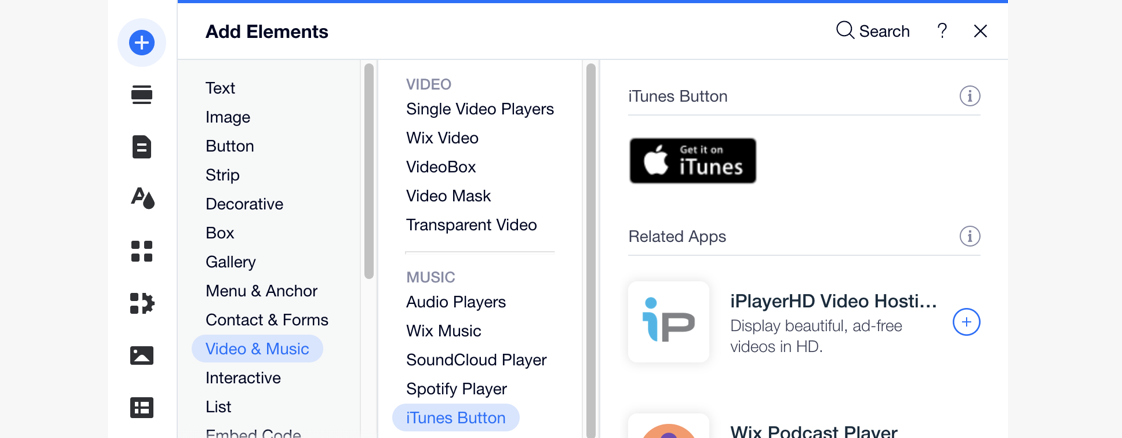
A screenshot showing how to add an iTunes button in the Add panel.

Step 2 | Choose your music from iTunes

After adding an iTunes button, connect it to your music by entering its direct link. Once visitors click the button, it takes them to the song, album, playlist or music video you chose on iTunes.

To add music to your iTunes button:

  1. Click the iTunes button in your Editor.

  2. Click Enter Link.

  3. Choose what to do next:Paste an iTunes link: Enter the URL under What's the iTunes direct link?.

    Find music on iTunes:Click Search iTunes to go to iTunes.
    Enter a search phrase for the music you want to add.
    Click the relevant music item.
    Scroll to Content Link and click Copy Link.
    (In the Editor) Paste the link you just copied under What's the iTunes direct link?.
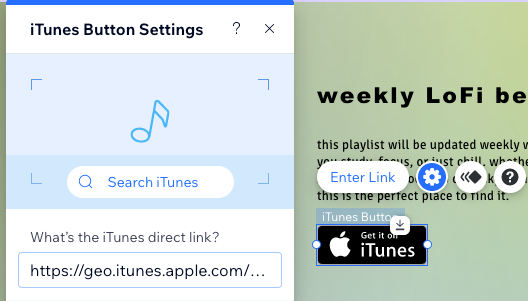
A screenshot of the iTunes button settings panel, where you can enter the iTunes link to your music

Step 3 | Set up your iTunes button

Now that your button is linked to the right place on iTunes, make sure it appears in the right language. You can also choose if you want your music to open in a new window or the same window as your site.

To set up your iTunes button:

  1. Click the iTunes button in your Editor.

  2. Click the Settings icon .

  3. Select the relevant language from the drop-down under This button is in:.

  4. Choose an option under How does the player open?:In a new window: Opens in a new tab on the browser.
    In the same window: Opens in the same window as the site page.
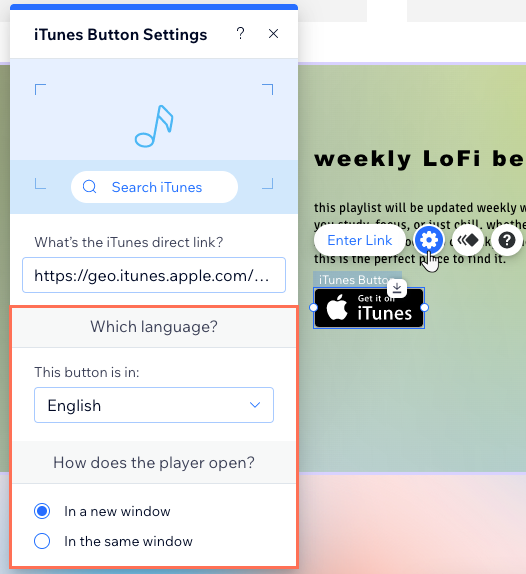
A screenshot of the iTunes Button Settings panel where you set up the language and where the link opens

Need A Professional Website?
Contact Us 
Today!

Google Workspace Error Message: "Your subscription has been suspended by your reseller"

Google Workspace Error Message: Service Is Temporarily Suspended until Your Customer Accepts the New Terms of Service

Google Workspace Error Message: "You already have a Google Workspace business email account. You can manage it from the Google Admin Console"

Google Workspace: Data Migration from an External Email to Your Google Workspace

Google Workspace: Revoking Admin Status to Delete a Workspace Account

Google Workspace: Connecting Your Business Email to a Mail Client Using IMAP and SMTP

Google Workspace: Changing the Language of Your Business Email

Google Workspace: Emails Missing from Your Business Email

Google Workspace: Allowing Access for ‘Less Secure Apps’ in Your Business Email

Google Workspace: Adding Google Workspace MX Records to Your Wix Account

Google Workspace: Setting Up a Domain Alias

Google Workspace: Manually Verifying Your Domain with Google

Google Workspace: Connecting a Business Email for a Domain Pointing to Wix

Google Workspace: Setting Up an Email Alias for an Existing Workspace User Email Address

Google Workspace: Resetting a Workspace User's Password

Google Workspace: Renaming a Workspace User

Google Workspace: Accessing Your Additional Workspace Users

Google Workspace: Purchasing Additional Business Emails from Wix

Google Workspace: Setting Up Business Email Users

Gemini for Google Workspace: An Overview

Google Workspace: Upgrading a Workspace Plan

Google Workspace: Choosing a Plan

Google Workspace: Business Email Sending Limits

Google Workspace: Forwarding Emails From Your Business Email to Another Email Address

Google Workspace: Resetting Your Admin Password

Google Workspace: Accessing Your Admin Console

Google Workspace: Identifying Your Admin Workspace User

Google Workspace: Setting Up Your Business Email on Mobile Devices

Google Workspace: Username and Password Guidelines

Google Workspace: Accessing your Business Email Through Your Wix Account

wix experts
Graphic2Traffic web design
©
bottom of page