top of page

Managing reservations

Manually Adding Reservations in Wix Hotels

Important:

This article refers to the original Wix Hotels. If you are using the new Wix Hotels by HotelRunner, which is not yet available to all users, please read the information here. Learn how to check which version of Wix Hotels you are using.

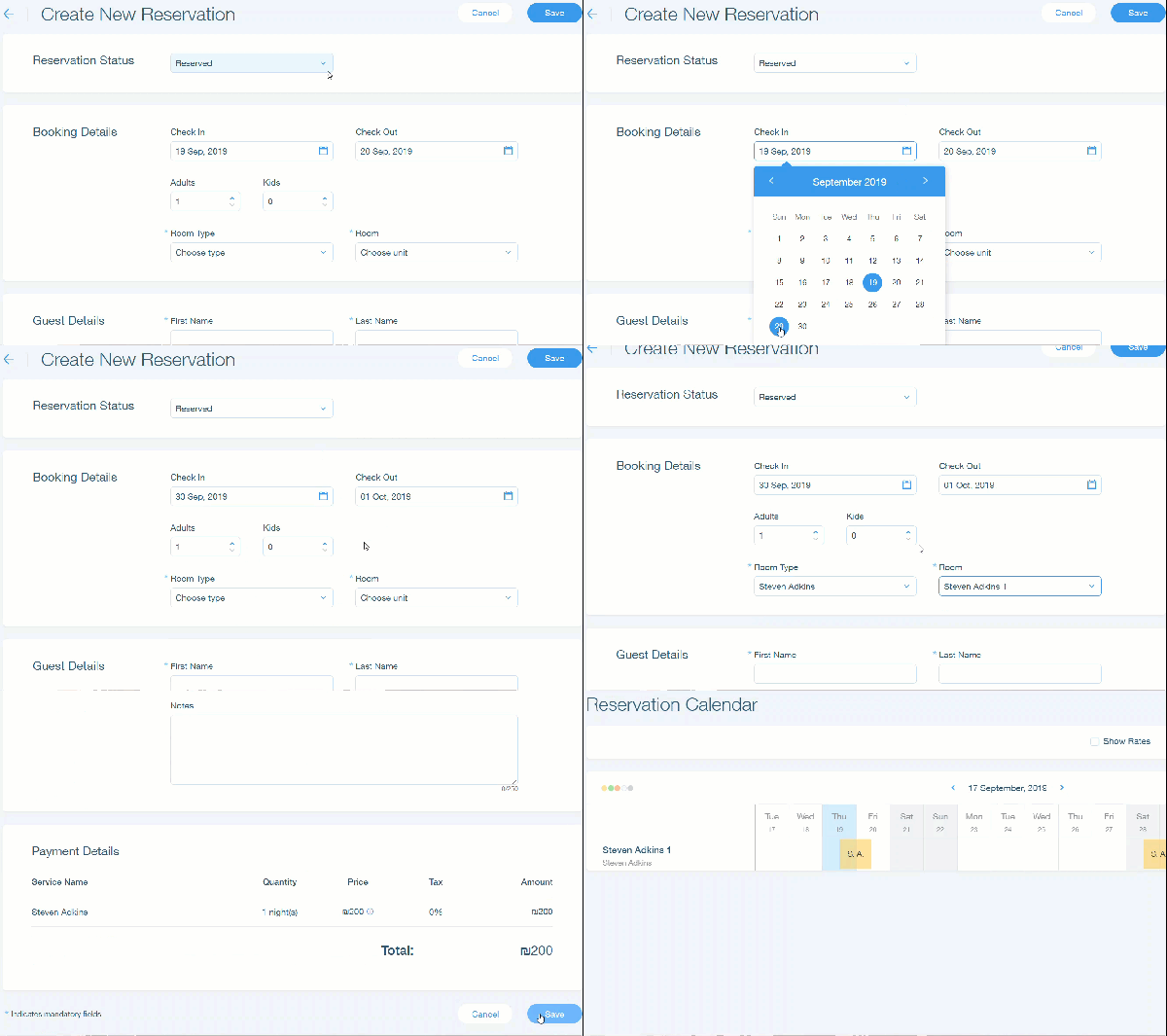
Wix Hotels allows you to manually add reservations received offline (phone, email, etc.).

You can also update a reservation status when your guests have checked in or out.

To manually add reservations:

  1. Go to your dashboard.

  2. Click the Hotels tab.

  3. Click the Reservations tab.

  4. Click New Reservation.

  5. Click the Reservation Status drop-down menu and select a reservation type.Reserved: This booking is to reserve a room.
    Checked In: The guests have checked in.
    Checked Out: The guests have checked out.
    Not Available: This room is not available.

  6. Enter the booking details (Check in, Check Out, etc.)

  7. Enter the guest details (First Name, Last Name, Phone Number, etc.).                                        Note: Payment details will display after selecting your Room and Room Type.

  8. Click Save.

Note:

To accept payments for manual reservations, you must have a payment processor which accepts offline payments. After your guest pays for the reservation, you can update the reservation status and notes.
Tip:

You can also manually add a reservation by selecting dates on the calendar and clicking Create Reservation.

Need A Professional Website?
Contact Us 
Today!

Troubleshooting Third Party Provider Connection Issues

Connecting GB Prime Pay as a Payment Provider

Payze No Longer Available to Connect as a Payment Provider

Connecting Pagsmile as a Payment Provider

Connecting Rakuten as a Payment Method (through KOMOJU)

Receiving Payouts from Third-Party Payment Providers

Connecting Paidy as a Payment Method (through KOMOJU)

Connecting Param as a Payment Provider

Connecting HitPay as a Payment Provider

Connecting MagicPay as a Payment Provider

Connecting Payflex as a Payment Provider

Connecting Paytm for Business as a Payment Provider

Connecting Opn Payments as a Payment Provider

Connecting PayWay by Hrvatski Telekom as a Payment Provider

Connecting CoinGate as a Payment Provider for Cryptocurrency Payments

Connecting Vyne as a Payment Provider

Connecting iKhokha as a Payment Provider

Connecting Triple-A Crypto Payment Gateway as a Payment Provider

Connecting Payzone as a Payment Provider

Connecting Payguru as a Payment Provider

Connecting Grow by Meshulam as a Payment Provider

Refunding Your Customers with Third Party Payment Providers

Connecting PayZen by Lyra as a Payment Provider

Connecting Twint (Provided by PEND) as a Payment Provider

Connecting Pelecard as a Payment Provider

Connecting Dragonpay as a Payment Provider

Connecting Cashfree Payments as a Payment Provider

Connecting Priority Payments as a Payment Provider

Connecting Sipay as a Payment Provider

Connecting Nuvei as a Payment Provider

wix experts
Graphic2Traffic web design
©
bottom of page