top of page

Check-in by Wix for Events

Check-in by Wix: An Overview

Welcome to Check-in by Wix—your mobile solution for seamless event door management.

As an event organizer,  you can add staff members to assist with guest check-ins, track ticket sales and ticket scanning at the door. You have complete control over your event, enabling you to accommodate last-minute attendees, sell tickets instantly, and monitor event statistics.

Whether you're an experienced event planner or just starting out, this app is your all-in-one solution to simplify your process and ensure your event runs smoothly from start to finish.

A screenshot of various images of the Check-in by Wix app.

Ready to get started?

Download the Check-in by Wix app right to your mobile device.

Add and manage staff members

Simplify event door management by adding staff members to your events. Whether it's for all your events or just specific ones, you have the flexibility to assign them as needed. Then, onboard your staff to the app by sending them an invite link or having them scan a QR code.

Once your staff members have access to the app, they can check in guests at the door, scan tickets, or monitor ticket sales, allowing you to focus on managing the event itself.
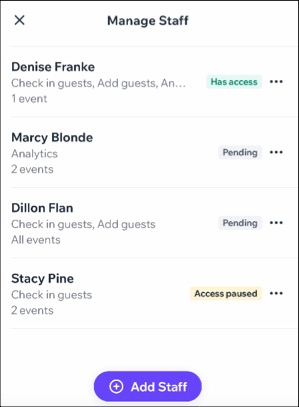
A screenshot of staff members assigned to an event in the Check-in by Wix app.

Check-in and manage your guests

You and your staff can easily scan tickets by type, ensuring a smooth check-in process for guests. Keep your guest list organized for big events using our filters, allowing you to track arrivals based on payment statuses and ticket categories.
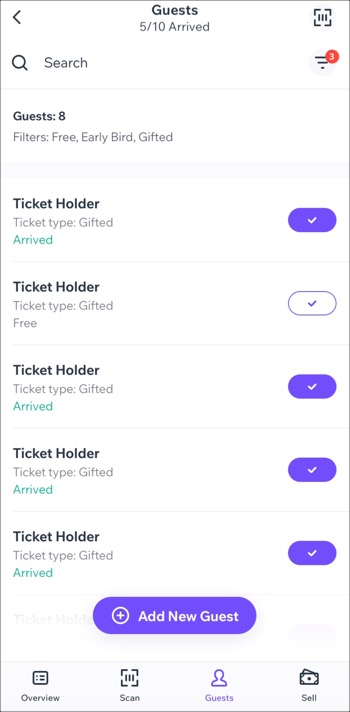
A screenshot of a guest list in the Check-in by Wix app.

Add new guests at your event door

Add new guests on-the-fly at your event door, perfect for situations where your event isn't sold out and you have leftover tickets. Easily accommodate last-minute attendees by swiftly assigning these tickets to new guests.

By filling in those remaining seats, you can maximize attendance as well as your potential revenue.

A screenshot of adding a new guest to the guest list in the Check-in by Wix app.

Sell tickets on the spot with a mobile POS

Sell event tickets at the door or collect in-person payments using our mobile Point of Sale (POS) system. Streamline event lineups with secure, contactless sales on the spot, enabling walk-ins to purchase tickets seamlessly until the last minute.

A screenshot of selling a ticket in the Check-in by Wix app.

Keep track of event stats

Gain access to comprehensive statistics for your event such as total sales, tickets sold, and page views. You can track trends over specific time periods to gain insights into guest order information, including purchase times.

This is the perfect tool to identify patterns that can enhance your next event's ticket sales strategy.

A screenshot of event stats displayed in the Check-in by Wix app.

Need A Professional Website?
Contact Us 
Today!

Google Workspace Error Message: "Your subscription has been suspended by your reseller"

Google Workspace Error Message: Service Is Temporarily Suspended until Your Customer Accepts the New Terms of Service

Google Workspace Error Message: "You already have a Google Workspace business email account. You can manage it from the Google Admin Console"

Google Workspace: Data Migration from an External Email to Your Google Workspace

Google Workspace: Revoking Admin Status to Delete a Workspace Account

Google Workspace: Connecting Your Business Email to a Mail Client Using IMAP and SMTP

Google Workspace: Changing the Language of Your Business Email

Google Workspace: Emails Missing from Your Business Email

Google Workspace: Allowing Access for ‘Less Secure Apps’ in Your Business Email

Google Workspace: Adding Google Workspace MX Records to Your Wix Account

Google Workspace: Setting Up a Domain Alias

Google Workspace: Manually Verifying Your Domain with Google

Google Workspace: Connecting a Business Email for a Domain Pointing to Wix

Google Workspace: Setting Up an Email Alias for an Existing Workspace User Email Address

Google Workspace: Resetting a Workspace User's Password

Google Workspace: Renaming a Workspace User

Google Workspace: Accessing Your Additional Workspace Users

Google Workspace: Purchasing Additional Business Emails from Wix

Google Workspace: Setting Up Business Email Users

Gemini for Google Workspace: An Overview

Google Workspace: Upgrading a Workspace Plan

Google Workspace: Choosing a Plan

Google Workspace: Business Email Sending Limits

Google Workspace: Forwarding Emails From Your Business Email to Another Email Address

Google Workspace: Resetting Your Admin Password

Google Workspace: Accessing Your Admin Console

Google Workspace: Identifying Your Admin Workspace User

Google Workspace: Setting Up Your Business Email on Mobile Devices

Google Workspace: Username and Password Guidelines

Google Workspace: Accessing your Business Email Through Your Wix Account

wix experts
Graphic2Traffic web design
©
bottom of page