top of page

Setting up Wix Hotels

Adding Languages in Wix Hotels

Important:

This article refers to the original Wix Hotels. If you are using the new Wix Hotels by HotelRunner, which is not yet available to all users, please read the information here. Learn how to check which version of Wix Hotels you are using.

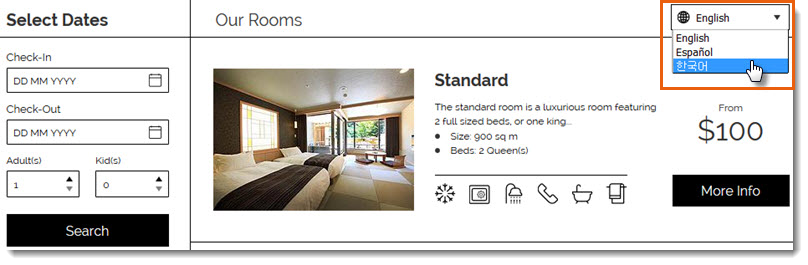
You can add up to 14 languages in your Wix Hotels app to make it easier for people all over the world to book your property. Your guests can choose their language from a drop-down menu at the top of your Rooms List.
Note:

  • Wix Hotels currently supports the following languages: English, Spanish, French, German, Italian, Portuguese, Korean, Japanese, Dutch, Danish, Norwegian, Polish, Russian, Swedish and Turkish.

  • Adding languages to Wix Hotels is a premium feature only available when you upgrade Wix Hotels.

To add a language in Wix Hotels:

  1. Go to your site's dashboard.

  2. Click the Hotels tab on the left.

  3. Click the Languages tab.

  4. Click Create New.

  5. Click the Translate to drop-down menu and select a language.

  6. Do one of the following:
    Auto Translate:Click Auto Translate to instantly translate your text with Google Translate.
    (Optional) Manually edit the text. Click See Current Text to view original text for each field.
    Translate the texts yourself: Enter the translated text in the relevant fields. Click See Current Text to view original text for each field.

  7. Click Save.

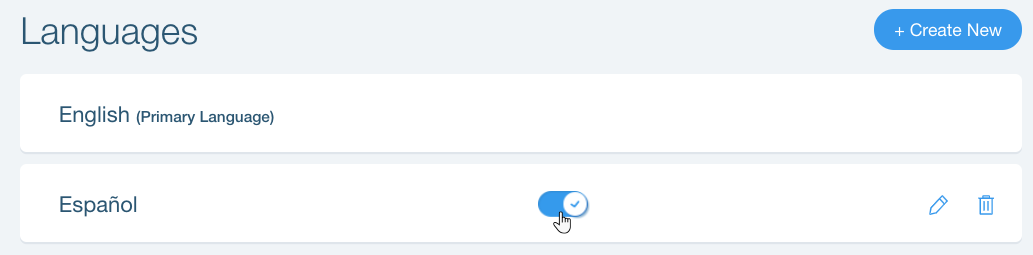
After you've added a language, you can enable or disable it at any time by clicking the toggle next to the relevant language on the Languages tab.
Tips:

  • You can only use Auto Translate when adding a new language. To use auto translate for an existing language, first delete the language then add it again.

Need A Professional Website?
Contact Us 
Today!

Connecting Authorize.net Powered by Bankful as a Payment Provider

Connecting Klarna as a Payment Provider

Connecting SeerBit as a Payment Provider

Connecting Webpay Plus-Transbank as a Payment Provider

Connecting Atome as a Payment Provider

Connecting Affirm as a Payment Provider

Connecting Pay TR as a Payment Provider

Connecting Sezzle as a Payment Provider

Connecting CXPay as a Payment Provider

Connecting Afterpay as a Payment Provider

Connecting Rapyd Payments as a Payment Provider

Connecting Clearpay as a Payment Provider

Connecting Yoco as a Payment Provider

Connecting Titre Restaurants Conecs as a Payment Method (Through Lyra)

Connecting Multibanco as a Payment Method (Through Lyra Collect)

Connecting Fondy as a Payment Provider

Connecting Xendit as a Payment Provider

Connecting Razorpay as a Payment Provider

Connecting Laybuy as a Payment Provider

Connecting Lyra Collect as a Payment Provider

Connecting UAPay as a Payment Provider

Connecting Paysafecash as a Payment Method (through Skrill)

Connecting Rapid Transfer as a Payment Method (through Skrill)

Connecting Przelewy24 as a Payment Method (through Skrill)

Connecting Skrill Digital Wallet as a Payment Method

Connecting Skrill as a Payment Provider for Credit/Debit Card Transactions

Connecting Mobile Payment as a Payment Method (Through KOMOJU)

Connecting Pay-Easy as a Payment Method (Through KOMOJU)

Connecting WeChat Pay as a Payment Method (Through Oceanpayment)

Connecting AliPay as a Payment Method (Through Oceanpayment)

wix experts
Graphic2Traffic web design
©
bottom of page