top of page

Setting up Wix Hotels

Adding Languages in Wix Hotels

Important:

This article refers to the original Wix Hotels. If you are using the new Wix Hotels by HotelRunner, which is not yet available to all users, please read the information here. Learn how to check which version of Wix Hotels you are using.

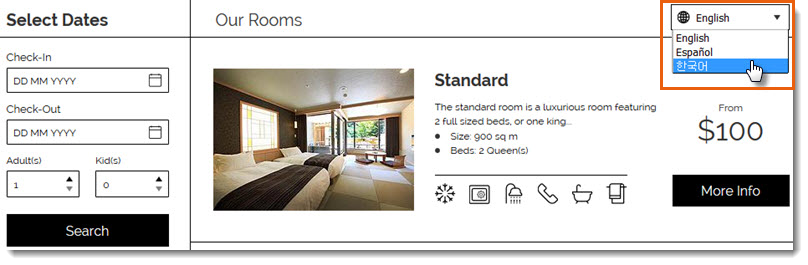
You can add up to 14 languages in your Wix Hotels app to make it easier for people all over the world to book your property. Your guests can choose their language from a drop-down menu at the top of your Rooms List.
Note:

  • Wix Hotels currently supports the following languages: English, Spanish, French, German, Italian, Portuguese, Korean, Japanese, Dutch, Danish, Norwegian, Polish, Russian, Swedish and Turkish.

  • Adding languages to Wix Hotels is a premium feature only available when you upgrade Wix Hotels.

To add a language in Wix Hotels:

  1. Go to your site's dashboard.

  2. Click the Hotels tab on the left.

  3. Click the Languages tab.

  4. Click Create New.

  5. Click the Translate to drop-down menu and select a language.

  6. Do one of the following:
    Auto Translate:Click Auto Translate to instantly translate your text with Google Translate.
    (Optional) Manually edit the text. Click See Current Text to view original text for each field.
    Translate the texts yourself: Enter the translated text in the relevant fields. Click See Current Text to view original text for each field.

  7. Click Save.

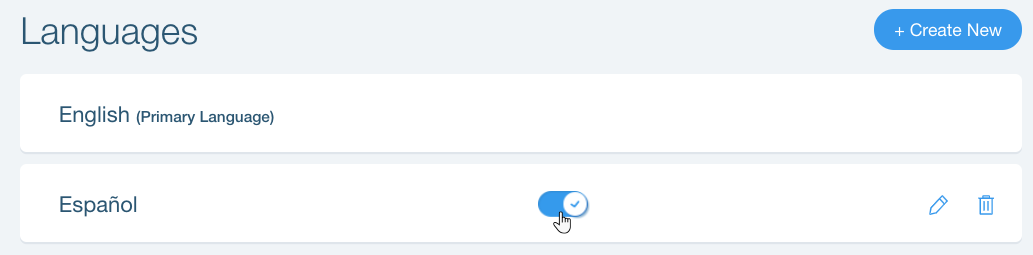
After you've added a language, you can enable or disable it at any time by clicking the toggle next to the relevant language on the Languages tab.
Tips:

  • You can only use Auto Translate when adding a new language. To use auto translate for an existing language, first delete the language then add it again.

Need A Professional Website?
Contact Us 
Today!

Connecting FIBONATIX as a Payment Provider

Connecting izipay as a Payment Provider

Connecting FasterPay as a Payment Provider

Connecting Kashier Payment Solutions as a Payment Provider

Disabling 2Checkout's Unfinished Payments Feature to Avoid Failed Transactions

Requiring a Customer Phone Number When Checking Out with PayPal

Disabling PayPal Encryption Messages

Connecting Smartphone Payment as a Payment Method (through KOMOJU)

Connecting Bankful as a Payment Provider for Cryptocurrency, Wallet and Credit Card Payments

Connecting Paymentwall as a Payment Provider

Connecting ACH by Choice as a Payment Provider

Connecting Vipps as a Payment Provider

Connecting Mollie as a Payment Provider

Connecting MONEI as a Payment Provider

Connecting payabl. as a Payment Provider

Connecting PayPlus as a Payment Provider

Connecting Tilopay as a Payment Provider

Connecting SumUp as a Payment Provider

Connecting YooKassa (YooMoney) as a Payment Provider

Connecting Square as a Payment Provider

Connecting Stripe as a Payment Provider

Connecting Online Bank Transfer by Klarna as a Payment Method (Through Stripe)

Connecting PayPal as a Payment Provider

Connecting Pay-Easy or Convenience Stores as a Payment Method (Through GMO)

Connecting PagueloFacil as a Payment Provider

Connecting PagSeguro as a Payment Provider

Connecting Mercado Pago as a Payment Provider

Connecting Max as a Payment Provider

Connecting bit (Provided by Isracard powered by PayMe) as a Payment Method

Connecting Evergreen Payments Northwest as a Payment Provider

wix experts
Graphic2Traffic web design
©
bottom of page