top of page

wix studio

Adding a Loop Animation

Create a sense of movement in your design with animations that loop continuously. You can add a loop animation to any element you want visitors to notice - some are more subtle and some are true attention grabbers.

Go to our Wix Studio Academy to check out additional Wix Studio webinars, tutorials, and courses.


In this article, learn more about:

Tip:

When adding an animation on the desktop breakpoint, it cascades down to the smaller breakpoints. However, you can set a different animation, or customize the same animation, per breakpoint.

Adding a loop animation

You can add a loop animation to specific elements and sections, or the site page as a whole.

To adding a loop animation

  1. Select the relevant element.

  2. Click the Open Inspector icon  at the top right of the editor.

A screenshot of opening the Inspector panel in the Studio Editor.

  1. Click the Animations and Effects tab .

  2. Click + Add under Loop.

  3. Select an animation from the list.
    Tip: Hover over animations to see a preview of how they look.
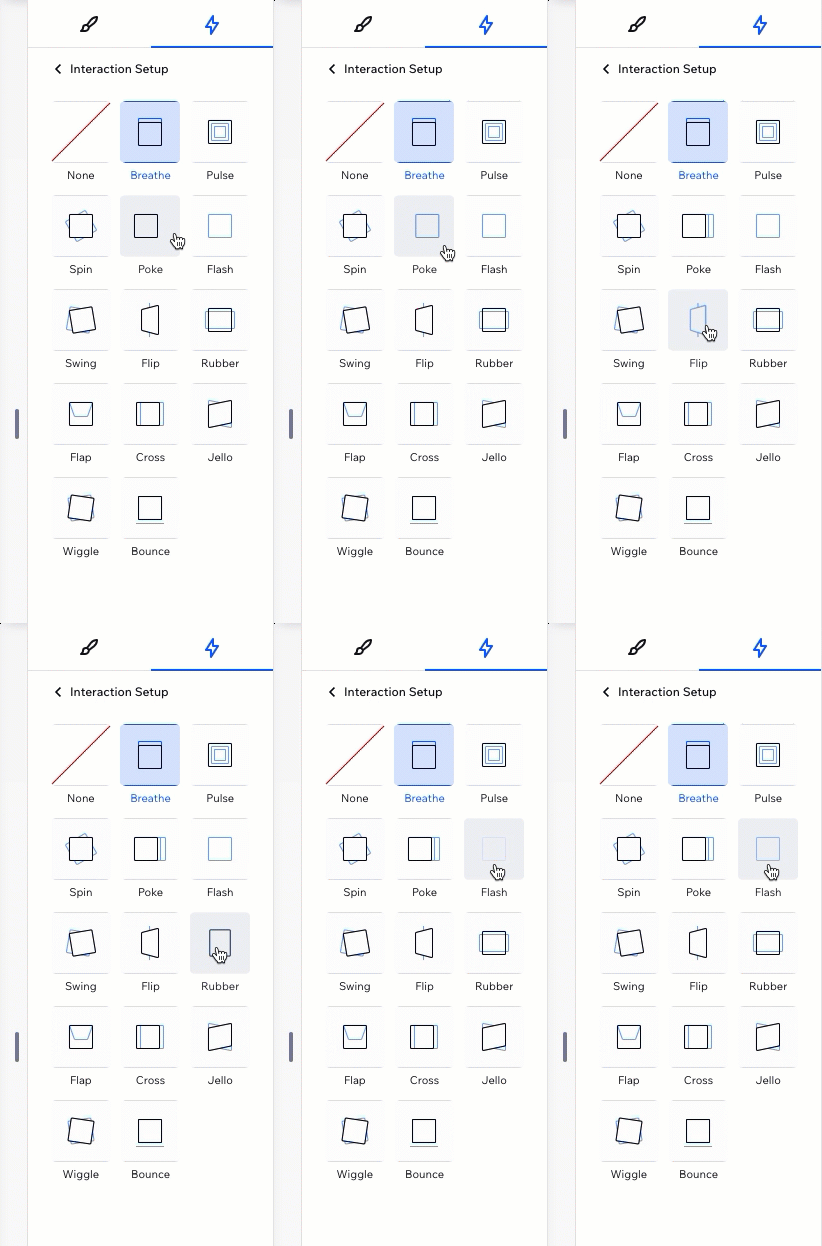
A GIF showing the available loop animations and how hovering over them shows a preview

Customizing a loop animation

After choosing an animation, set it up to behave the way you want. Choose how long the animation lasts, set the intensity, add a delay in between repeats, and more.

To customize a loop animation:

  1. Select the relevant element.

  2. Click the Open Inspector icon  at the top right of the editor.

A screenshot of opening the Inspector panel in the Studio Editor.

  1. Click the Animations and Effects tab .

  2. Click the animation you want to change.

  3. Click Adjust Animation to change its settings:Direction: Choose the direction the animation should come from (e.g. from left, from above).
    Intensity: Make this animation more subtle or aggressive.
    Duration: Change the length of time of the animation.
    Repeat Delay: Add a delay (in seconds) in between the infinite repeats of the animation.
    Easing: Choose how gradually the animation should ease in and/or out.

Note:

The available settings depend on the animation you choose.
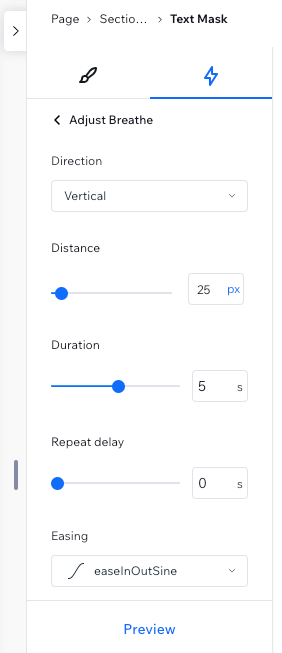
A screenshot of the available adjustment options for the Breathe loop animation

Removing a loop animation

You can remove a loop animation at any time from the Inspector panel.

To remove a loop animation:

  1. Select the relevant element.

  2. Click the Open Inspector icon  at the top right of the editor.

A screenshot of opening the Inspector panel in the Studio Editor.

  1. Click the Animations and Effects tab .

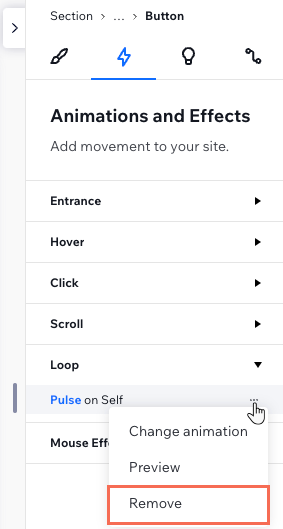
  2. Hover over the animation and click the More Actions icon .

  3. Click Remove.

Removing a loop animation from the Inspector panel

Need A Professional Website?
Contact Us 
Today!

Google Workspace Error Message: "Your subscription has been suspended by your reseller"

Google Workspace Error Message: Service Is Temporarily Suspended until Your Customer Accepts the New Terms of Service

Google Workspace Error Message: "You already have a Google Workspace business email account. You can manage it from the Google Admin Console"

Google Workspace: Data Migration from an External Email to Your Google Workspace

Google Workspace: Revoking Admin Status to Delete a Workspace Account

Google Workspace: Connecting Your Business Email to a Mail Client Using IMAP and SMTP

Google Workspace: Changing the Language of Your Business Email

Google Workspace: Emails Missing from Your Business Email

Google Workspace: Allowing Access for ‘Less Secure Apps’ in Your Business Email

Google Workspace: Adding Google Workspace MX Records to Your Wix Account

Google Workspace: Setting Up a Domain Alias

Google Workspace: Manually Verifying Your Domain with Google

Google Workspace: Connecting a Business Email for a Domain Pointing to Wix

Google Workspace: Setting Up an Email Alias for an Existing Workspace User Email Address

Google Workspace: Resetting a Workspace User's Password

Google Workspace: Renaming a Workspace User

Google Workspace: Accessing Your Additional Workspace Users

Google Workspace: Purchasing Additional Business Emails from Wix

Google Workspace: Setting Up Business Email Users

Gemini for Google Workspace: An Overview

Google Workspace: Upgrading a Workspace Plan

Google Workspace: Choosing a Plan

Google Workspace: Business Email Sending Limits

Google Workspace: Forwarding Emails From Your Business Email to Another Email Address

Google Workspace: Resetting Your Admin Password

Google Workspace: Accessing Your Admin Console

Google Workspace: Identifying Your Admin Workspace User

Google Workspace: Setting Up Your Business Email on Mobile Devices

Google Workspace: Username and Password Guidelines

Google Workspace: Accessing your Business Email Through Your Wix Account

wix experts
Graphic2Traffic web design
©
bottom of page