top of page

Managing store inventory

Wix Stores: Displaying an 'Out of Stock' Notice on a Product

When one of your products is out of stock, an Out of Stock message automatically appears in the Product Gallery and in the Product Page.
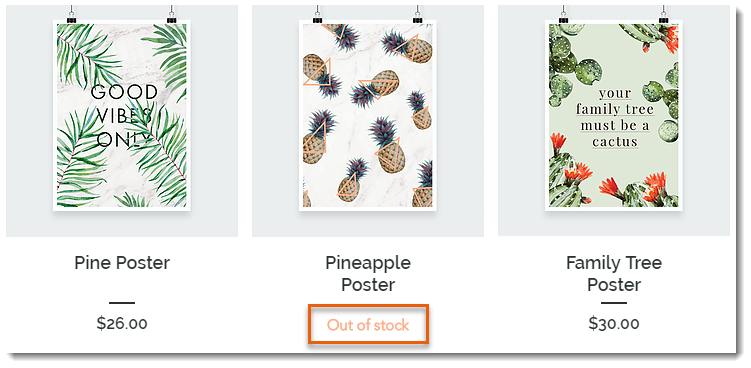
Screenshot of a Product Gallery  where the Add to Cart button text displays Out of Stock instead

Tip:

Instead of the "Out of Stock" message, you can set up back-in-stock notifications. This way, when an item is out of stock, customers see a "Notify When Available" message and can sign up to get an email letting them know when the item is available. Learn more

In this article, learn how to:

Customizing the message in Product Galleries

If you display a button in your product gallery, it changes automatically to an "Out of Stock" message when needed. You can customize the text of the "Out of stock" message.

Wix Editor

Studio Editor

  1. Go to your editor.

  2. Go to the page with the gallery you want to customize.

  3. Click the gallery on your page.

  4. Click Settings .

  5. Edit the text:Click the Text tab.
    Edit the "Out of Stock" text.

Customizing the message in the Product Page

When a product is out of stock, the Add to Cart button in the Product Page automatically changes to an Out of Stock button. The color and font of this button cannot be edited, but you can edit the message text.
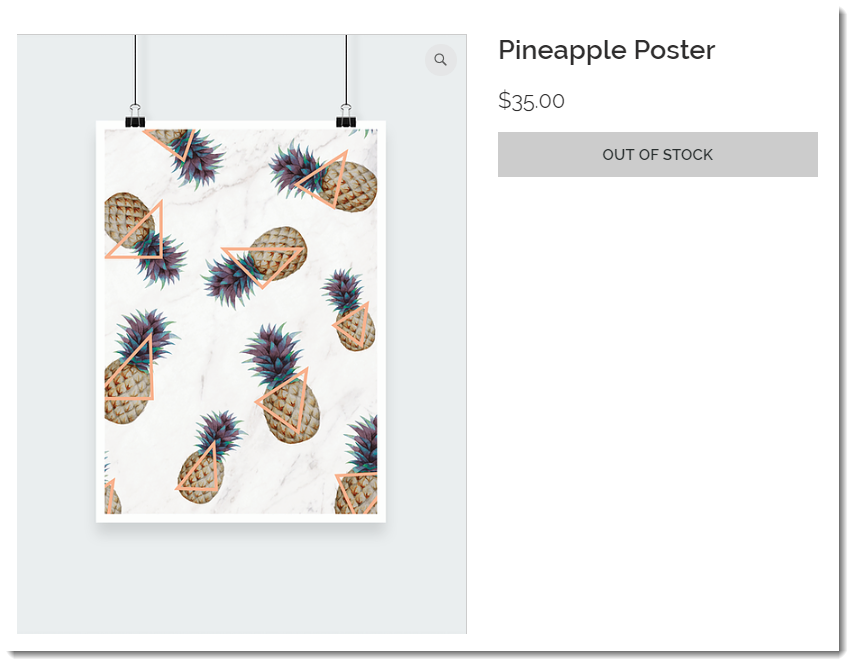
Screenshot of the Product Page where the Add to Cart button text displays Out of Stock instead

To customize the "Out of stock" message in the Product Page:

Wix Editor

Studio Editor

  1. Go to your editor.

  2. Go to your Product page:Click Pages & Menu  on the left side of the editor.
    Click Store Pages.
    Click Product Page.

  3. Click the Product Page element on your page.

  4. Click the Text tab.

  5. Edit the "Out of Stock Message" text.

Need A Professional Website?
Contact Us 
Today!

Wix Stores: Accepting Payment by Manually Entering a Credit Card in the Wix App

Wix Stores: Customizing Your Store in the Wix Mobile Apps

Wix Stores: Adding Images, GIFs, and Videos to a Product in the Wix App

Wix Stores: Setting Up Shipping Using the Wix App

Wix Stores: Creating Coupons Using the Wix App

Wix Stores: Canceling and Refunding Orders Using the Wix App

Wix Stores: Adding Tracking Numbers to Orders in the Wix App

Wix Stores: Managing Your Orders from the Wix App

Wix Stores: Managing Inventory Using the Wix App

Wix Stores: Creating and Managing Categories Using the Wix App

Wix Stores: Sharing a Product Using the Wix App

Wix Stores: Duplicating a Product Using the Wix App

Wix Stores: Adding Product Options Using the Wix App

Wix Stores: Adding a Product in the Wix App

Wix Stores: Start Selling in the Wix Member Apps

Wix Stores: Tagging and Displaying Product on YouTube

Wix Stores: Connecting Your YouTube Channel to Wix

Wix Stores: Creating a Faire Store Using the Faire Integration App

Wix Stores: Adding the "Multiorders Etsy & eBay Sync" App

Wix Stores: Adding and Setting Up Google Merchant Solutions

Wix Stores: Adding Store Products to Your TikTok for Business Catalog

Wix Stores: Connecting and Setting Up an Amazon Shop

Wix Stores: Managing How Products Are Listed on eBay

Wix Stores: Connecting and Setting Up an eBay Shop

Wix Stores: Tagging Instagram Posts and Stories

Wix Stores: Promoting Your Facebook Shop Using Dynamic Ads

Wix Stores: Tagging Store Products in a Facebook Post

Wix Stores: Adding a "View Shop" Button to Your Facebook Shop

Wix Stores: Changes to Facebook Shops

Wix Stores: Creating a Facebook Shop Using the Facebook Shops by GoDataFeed App

wix experts
Graphic2Traffic web design
©
bottom of page