top of page

Selling and promoting your music

Wix Music: Setting Up Your Payment Methods

Your fans can buy your music in Wix Music and Wix does not charge a cent.

Important:

  • Set up your payment methods by following the steps below before selling your music.

  • The album should not be edited after a purchase is made as this can cause an error with the download link.

To set up your payments:

  1. Go to Accept Payments in your site's dashboard.

  2. Set up the payment methods you want to use.

To change your currency:

  1. Go to Music Library in your site's dashboard.

  2. Hover over the relevant single/album/playlist and click the More Actions icon.

  3. Click Edit.

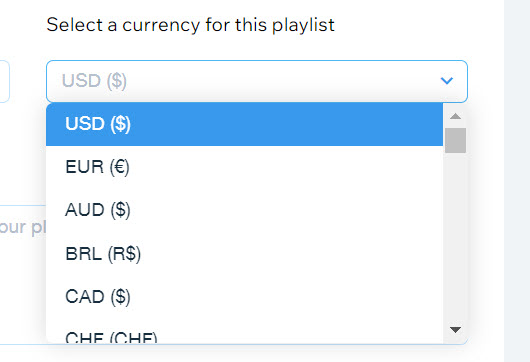
  4. Click the drop-down under Select a currency for this playlist.

  5. Select a currency.

  6. Click Save.

A screenshot of the currency selection drop-down menu.

Notes:

  • Currently, the following payment processors are not supported with Wix Music:pagueloFacil
    Isracard
    Offline.

  • For Wix Payments, there is a minimum amount of $1 per transaction. Make sure your release/track/album's price is over $1 if you're using this payment processor.

Need A Professional Website?
Contact Us 
Today!

Pricing Plans: Editing the Text in Your Pricing Plans Page

Pricing Plans: Reordering How You Display Your Plans

Pricing Plans: Allowing Clients to Cancel Plans

Pricing Plans: Making Site Pages Members-Only

Pricing Plans: Connecting a Plan to Content and Services

Pricing Plans: Editing an Existing Plan

Pricing Plans: Offering Your Clients a Free Trial Period

Pricing Plans: Creating a Free Plan

Pricing Plans: About Recurring Plans

Pricing Plans: Creating a Recurring Payment Plan

Pricing Plans: Creating a One-Time Payment Plan

Pricing Plans: Collecting Additional Information at Checkout

Pricing Plans: Allowing Guest Checkout on Your Site

Pricing Plans: Adding and Setting up a Loyalty Program

Pricing Plans: Automatically Creating Invoices for Purchased Plans

Pricing Plans: Adding the My Subscriptions Page to Your Site

Pricing Plans: Upgrading Your Site to Sell Plans Online

Pricing Plans: Managing Notifications You Send and Receive

Pricing Plans: Setting Up Tax Collection

Pricing Plans: Setting Up Payments

Pricing Plans: Adding the Pricing Plans App

Pricing Plans: An Overview

Check-in by Wix: Receiving Push Notifications on Your Mobile Device

Check-in by Wix: Adding People to an Event Guest List

Check-in by Wix: Checking in Guests to an Event

Check-in by Wix: Adding and Managing Staff Members

Check-in by Wix: Downloading the App

Check-in by Wix: An Overview

Wix Events: Creating Tickets for an Event Using the Wix App

Wix Events: Creating an Event Schedule in the Wix App

wix experts
Graphic2Traffic web design
©
bottom of page