top of page

Designing Wix Events

Wix Events: Displaying a Standalone Wix Events Button

If you write about an event somewhere on your site other than the Wix Events page, you can add a standalone event button. This makes it easy for interested site visitors to book.

Note:

The standalone event button is currently not available in Editor X.

To add an event button:

  1. Click Addon the left side of the Editor.

  2. Select Events.

  3. Drag the single event display to the page.
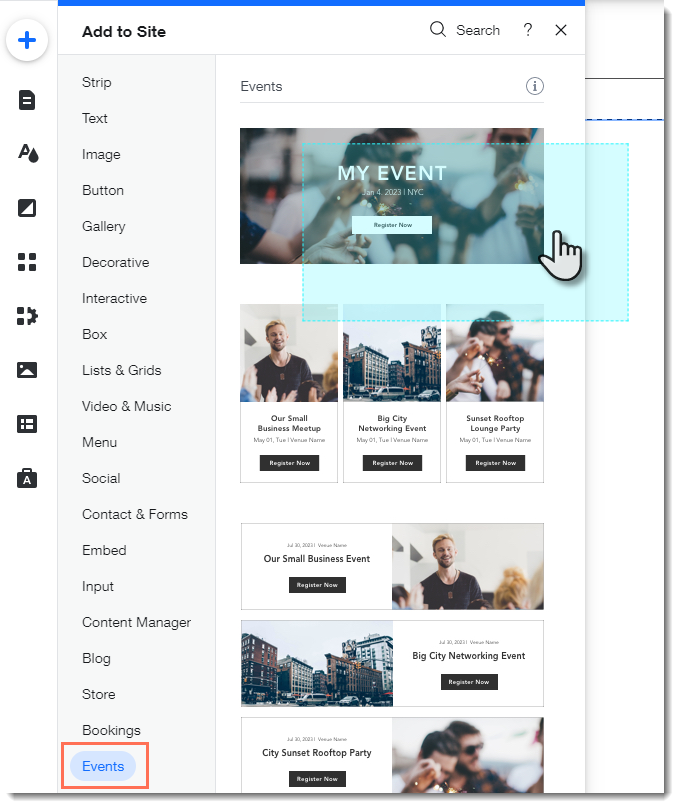
  1. Click the Wix Events app in the Editor.

  2. Click Display Events.

  3. Under What do you want to show?, select A Single Event.

  4. Select the relevant event.

  5. Click the Layout tab.

  6. Select Button.

  7. (Optional) Edit the button:Click the Text tab to edit the button text or add a label.
    Click the Design tab to edit the look of the button.

Need A Professional Website?
Contact Us 
Today!

Pricing Plans: Editing the Text in Your Pricing Plans Page

Pricing Plans: Reordering How You Display Your Plans

Pricing Plans: Allowing Clients to Cancel Plans

Pricing Plans: Making Site Pages Members-Only

Pricing Plans: Connecting a Plan to Content and Services

Pricing Plans: Editing an Existing Plan

Pricing Plans: Offering Your Clients a Free Trial Period

Pricing Plans: Creating a Free Plan

Pricing Plans: About Recurring Plans

Pricing Plans: Creating a Recurring Payment Plan

Pricing Plans: Creating a One-Time Payment Plan

Pricing Plans: Collecting Additional Information at Checkout

Pricing Plans: Allowing Guest Checkout on Your Site

Pricing Plans: Adding and Setting up a Loyalty Program

Pricing Plans: Automatically Creating Invoices for Purchased Plans

Pricing Plans: Adding the My Subscriptions Page to Your Site

Pricing Plans: Upgrading Your Site to Sell Plans Online

Pricing Plans: Managing Notifications You Send and Receive

Pricing Plans: Setting Up Tax Collection

Pricing Plans: Setting Up Payments

Pricing Plans: Adding the Pricing Plans App

Pricing Plans: An Overview

Check-in by Wix: Receiving Push Notifications on Your Mobile Device

Check-in by Wix: Adding People to an Event Guest List

Check-in by Wix: Checking in Guests to an Event

Check-in by Wix: Adding and Managing Staff Members

Check-in by Wix: Downloading the App

Check-in by Wix: An Overview

Wix Events: Creating Tickets for an Event Using the Wix App

Wix Events: Creating an Event Schedule in the Wix App

wix experts
Graphic2Traffic web design
©
bottom of page